Participant
Jan 14, 2023 5:07 AM UTC
Answered

Insert blank page automatically

Hi

I have several documents in one document, there are 3923 pages, some documents have one page each and some have 3 pages.
How could i insert an empty page automatically after pag. 1 of 1 and pag. 3 of 3.
I want to print the documents 2 sides.

This topic is closed to new replies. Start a new post to keep the conversation going.
bebarth
bebarthCorrect answer
Community Expert
Jan 14, 2023 6:40 PM UTC

Hi,

Try the action wizard included in the attached file or directly this script from the console:

d0=new Date();
starting=util.printd("mm/dd/yy – hh:MM:ss tt",d0);
var addBlankPageAfter=[];
for (var p=0; p<this.numPages-1; p++) {
	console.clear();
	console.println("Process starting: "+starting);
	console.println("Processing the page #"+(p+1)+"/"+this.numPages);
	var numWords=this.getPageNumWords(p);
	for (var i=0; i<numWords; i++) {
		var ckWord=this.getPageNthWord(p, i, true);
		if (this.getPageNthWord(p, i, false)=="pag. " && ((this.getPageNthWord(p, i+1, true)=="1" && this.getPageNthWord(p, i+2, true)=="of" && this.getPageNthWord(p, i+3, true)=="1") || (this.getPageNthWord(p, i+1, true)=="3" && this.getPageNthWord(p, i+2, true)=="of" && this.getPageNthWord(p, i+3, true)=="3"))) {
			addBlankPageAfter.push(p);
			break;
		}
	}
}
var pageBox=this.getPageBox("Crop",0);
if (addBlankPageAfter.length) {
	for (var i=addBlankPageAfter.length-1; i>=0; i--) {
		console.clear();
		console.println("Process starting: "+starting);
		console.println("Adding a blank page after page #"+(addBlankPageAfter[i]+1));
		this.newPage(addBlankPageAfter[i]+1, pageBox[2], pageBox[1]);
	}
	this.saveAs(this.path.replace(/.pdf$/i," & Blank Pages.pdf"));
	this.pageNum=0;
	this.viewState={overViewMode:2};
	var plurial=(addBlankPageAfter.length>1)?"s":"";
	var txt=addBlankPageAfter.length+" blank page"+plurial+" added.\r\r";
} else var txt="No page found in this document.\r\r";
df=new Date();
ending=util.printd("mm/dd/yy – hh:MM:ss tt",df);
console.println("\rProcess ending: "+ending);
temps=(df.valueOf()-d0.valueOf())/1000/60;
var theMinutes=parseInt(temps);
var theSeconds=(temps-theMinutes)*60;
var theSeconds=parseInt(theSeconds*10)/10;
var theTime="";
if (theMinutes>0) {
	if (theMinutes==1) var theTime="1 minute";
	else var theTime=theMinutes+" minutes";
}
if (theSeconds>0) {
	if (theSeconds<2) var theTime=theTime+" "+theSeconds+" second";
	else var theTime=theTime+" "+theSeconds+" seconds";
}
var theTime=theTime.replace(/^\s+|\s+$/gm,"");
txt+="Process starting: "+starting+"\rProcess ending: "+ending+"\rProcess duration: "+theTime;
console.clear(); console.show();
console.println(txt);
app.alert(txt,3);

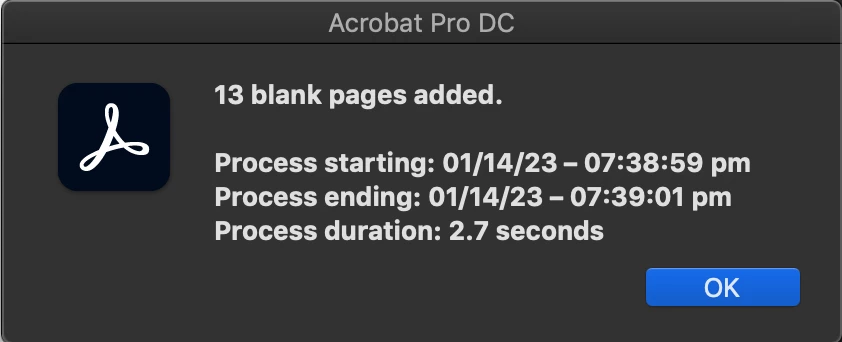
Here is the result of a test I did:
@+

 

13 replies

bebarth
Community Expert
bebarthCommunity ExpertCorrect answer
Community Expert
Jan 14, 2023 6:40 PM UTC

Hi,

Try the action wizard included in the attached file or directly this script from the console:

d0=new Date();
starting=util.printd("mm/dd/yy – hh:MM:ss tt",d0);
var addBlankPageAfter=[];
for (var p=0; p<this.numPages-1; p++) {
	console.clear();
	console.println("Process starting: "+starting);
	console.println("Processing the page #"+(p+1)+"/"+this.numPages);
	var numWords=this.getPageNumWords(p);
	for (var i=0; i<numWords; i++) {
		var ckWord=this.getPageNthWord(p, i, true);
		if (this.getPageNthWord(p, i, false)=="pag. " && ((this.getPageNthWord(p, i+1, true)=="1" && this.getPageNthWord(p, i+2, true)=="of" && this.getPageNthWord(p, i+3, true)=="1") || (this.getPageNthWord(p, i+1, true)=="3" && this.getPageNthWord(p, i+2, true)=="of" && this.getPageNthWord(p, i+3, true)=="3"))) {
			addBlankPageAfter.push(p);
			break;
		}
	}
}
var pageBox=this.getPageBox("Crop",0);
if (addBlankPageAfter.length) {
	for (var i=addBlankPageAfter.length-1; i>=0; i--) {
		console.clear();
		console.println("Process starting: "+starting);
		console.println("Adding a blank page after page #"+(addBlankPageAfter[i]+1));
		this.newPage(addBlankPageAfter[i]+1, pageBox[2], pageBox[1]);
	}
	this.saveAs(this.path.replace(/.pdf$/i," & Blank Pages.pdf"));
	this.pageNum=0;
	this.viewState={overViewMode:2};
	var plurial=(addBlankPageAfter.length>1)?"s":"";
	var txt=addBlankPageAfter.length+" blank page"+plurial+" added.\r\r";
} else var txt="No page found in this document.\r\r";
df=new Date();
ending=util.printd("mm/dd/yy – hh:MM:ss tt",df);
console.println("\rProcess ending: "+ending);
temps=(df.valueOf()-d0.valueOf())/1000/60;
var theMinutes=parseInt(temps);
var theSeconds=(temps-theMinutes)*60;
var theSeconds=parseInt(theSeconds*10)/10;
var theTime="";
if (theMinutes>0) {
	if (theMinutes==1) var theTime="1 minute";
	else var theTime=theMinutes+" minutes";
}
if (theSeconds>0) {
	if (theSeconds<2) var theTime=theTime+" "+theSeconds+" second";
	else var theTime=theTime+" "+theSeconds+" seconds";
}
var theTime=theTime.replace(/^\s+|\s+$/gm,"");
txt+="Process starting: "+starting+"\rProcess ending: "+ending+"\rProcess duration: "+theTime;
console.clear(); console.show();
console.println(txt);
app.alert(txt,3);

Here is the result of a test I did:

@+
 

Translate
DaktaryAuthor
Participant
Jan 14, 2023 7:22 PM UTC

ReferenceError: txt is not defined
1:Console:Exec
undefined

Translate
bebarth
Community Expert
Community Expert
Jan 14, 2023 8:34 PM UTC

Strange!

You execute the script from the console and the error comes from line #1 whereas the txt variable shoud come at the end of the script!

Did you copy/paste the entire code in the console then select all and ENTER key of the numerical panel?

@+

Translate
try67
Community Expert
Community Expert
Jan 14, 2023 5:10 PM UTC

This can be done with a script, if there's a way to identify where each document ends. Are there bookmarks pointing to the start of each document, for example?


Translate
DaktaryAuthor
Participant
Jan 14, 2023 6:47 PM UTC

All documents start on the right page with:
                                                                                                                           Annex No. 1
content
ending with:
__________________________________________________________________________
Printing Date: 03.01.2023 - 16:01                                                                           pag. 1 of 1


ex. 2

                                                                                                                            Annex No. 1
content
ending with:
__________________________________________________________________________
Printing Date: 03.01.2023 - 16:02                                                                            pag. 3 of 3

Translate
bebarth
Community Expert
Community Expert
Jan 14, 2023 6:49 PM UTC

Try my script, that should work!

...and let me know.

@+


Translate