
Participant
November 3, 2024
Question

Insert text comment - can't disable popup (2024)

  • November 3, 2024
  • 2 replies
  • 342 views

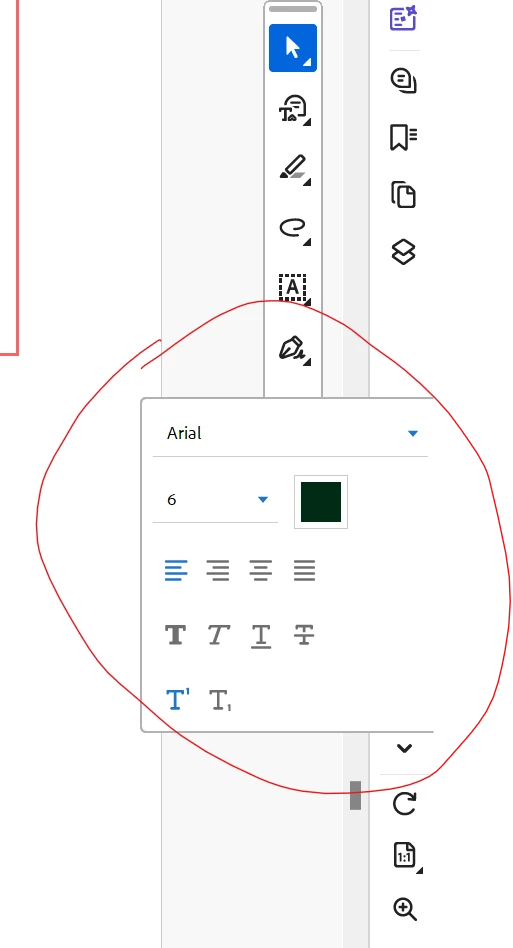
whenever I add a text comment into a pdf I get this popup that cannot be turned off or moved out of the way, unless I end and restart the adobe acrobat. It's there even if I don't have the "Add Text as Comment" tool is active - as you can see, I have the select tool selected but that popup is still there for no reason.


Is there a way to get rid of this thing? 


2 replies

S_S
Community Manager
Community Manager
February 19, 2025

Hi @toni_1563,


Hope you are doing well.


Have you tried the latest version of the application (2024.005.20xxx)?


We made many stability and performance enhancements with the subsequent releases.

To update the app, go to Menu-> Help-> Check for Updates.


If the issue persists in the latest version, please share a screen recording of your workflow, so we can try and reproduce it in-house. 


-Souvik

Adobe Employee
November 6, 2024

Hi @toni_1563 

Sorry for the inconvenience. We tried it at our end but not able to reproduce it. Can you please below details to help us investigate further.

1.  app version installed on your machine

2. Screen resolution of your machine (ideally the text formatting window should not overlap with the quick tools)

3. Since when did you start facing this issue, recently or happening for sometime.


Thanks,

Rohit A