

Participating Frequently
April 14, 2021
Question

Inserting a PDF Within a PDF

  • April 14, 2021
  • 4 replies
  • 1452 views

I want to insert a PDF within a PDF like the following:
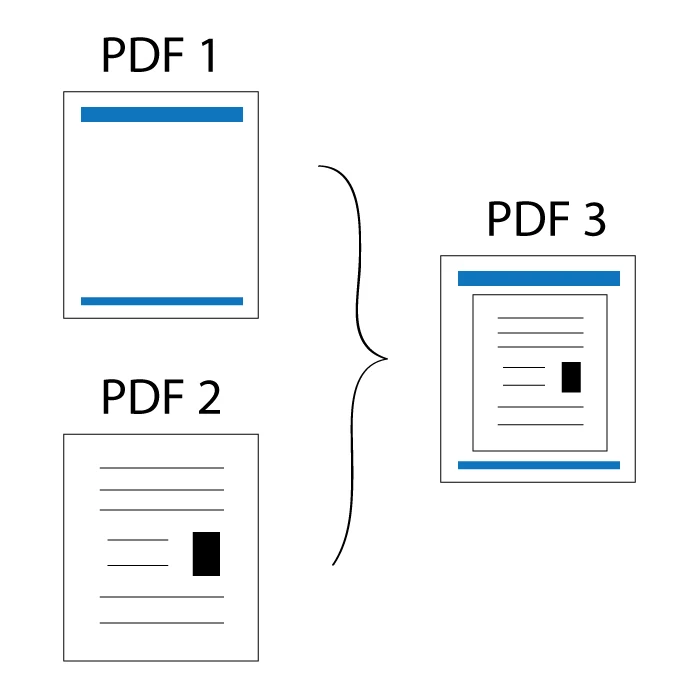
What are some ways to achieve this?


Thank you.

This topic has been closed for replies.

4 replies

Joel Geraci
Community Expert
Community Expert
April 15, 2021

Import PDF 1 as a layer to PDF 2.

Participating Frequently
April 16, 2021

If PDF #2 contains multiple pages, what is the best way to apply the PDF #1 template to all pages without doing it one by one?

I tried importing PDF #1 (the template page) as a layer to all pages of PDF #2, but that will cover some contents of PDF #2.


Thom Parker
Community Expert
Community Expert
April 19, 2021

A water mark will apply a layer to all pages, or a page range, all at once.  You can use an Action, custom Command, or a folder level automation script for this.  I'm partial to Automation scripts because you can activate them from toolbuttons on the Acrobat Quickbar.


Thom Parker - Software Developer at PDFScriptingUse the Acrobat JavaScript Reference early and often
Thom Parker
Community Expert
Community Expert
April 15, 2021

If this is a something you need to do on a consisten basis, and one of the PDFs is uesed all the time, then you should create an Action or Command to apply it.


Thom Parker - Software Developer at PDFScriptingUse the Acrobat JavaScript Reference early and often
Participating Frequently
April 15, 2021

Yes, this is something we will be doing on a consistent basis. The first PDF will act as a template with our header, footer, project name (will be changed every time a new project is created).


How can I create an Action or Command for this?

Luke Jennings3
Community Expert
Community Expert
April 15, 2021

Place both PDFs into InDesign, export to a new PDF.

Participating Frequently
April 15, 2021

Is there a way to do it within the Adobe Acrobat program?

This is something that a team of 30 will be using and getting them all to switch between Acrobat and InDesign will be challenging.

Document Geek
Community Expert
Community Expert
April 15, 2021

Import as watermark.

Participating Frequently
April 15, 2021

This may work actually!

If PDF #2 contains multiple pages, what is the best way to apply the PDF #1 template to all pages?

I tried inserting PDF #1 (the template page) as a watermark to all pages of PDF #2, but that will cover some contents of PDF #2.


Document Geek
Community Expert
Community Expert
April 15, 2021

Reduce the absolute scale.