


January 11, 2017
Answered

Installed Adobe Acrobat XI Pro on a computer with display properties at 150%

  • January 11, 2017
  • 1 reply
  • 1641 views

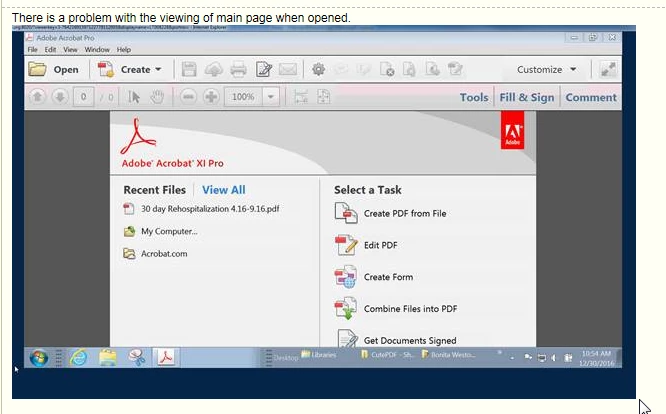
Installed Acrobat XI Pro on a computer that has higher screen size settings for a user with vision issues. The display size is set to 150%. The screen resolution is set to 1400x900. These are the settings she needs to use to see the screen. This is also with a dual monitor 24" screens.

Please tell me how to fix the main Adobe Acrobat window not to go off the bottom of the display (not viewable or accessible). If I put the display size of computer display down to 125%, it views fine, but she needs to have it set at 150%.
This topic has been closed for replies.
Correct answer Colin Holgate

The system requirements ask for 1024x768, and with 150% setting you're making the monitor seem like 960x600, hence some things falling off the bottom.

There was an update to Acrobat XI yesterday:

11.0.19 Planned update, January 10, 2017 — Acrobat and Adobe Reader Release Notes

I don't think it will solve the problem, but no harm in trying. Another option would be to see if you're eligible to get the later Acrobat DC version, its task window is resizable and scrollable. Here's a discussion about doing that upgrade:

Can I upgrade from Acrobat 11 Pro to DC Pro?

1 reply

Colin Holgate
Colin HolgateCorrect answer
Inspiring
January 11, 2017

The system requirements ask for 1024x768, and with 150% setting you're making the monitor seem like 960x600, hence some things falling off the bottom.

There was an update to Acrobat XI yesterday:

11.0.19 Planned update, January 10, 2017 — Acrobat and Adobe Reader Release Notes

I don't think it will solve the problem, but no harm in trying. Another option would be to see if you're eligible to get the later Acrobat DC version, its task window is resizable and scrollable. Here's a discussion about doing that upgrade:

Can I upgrade from Acrobat 11 Pro to DC Pro?