
Inspiring
October 16, 2023
Question

Interactive PDFs and accessibility... I know the answer is no but what should my compromise be?

  • October 16, 2023
  • 3 replies
  • 1496 views
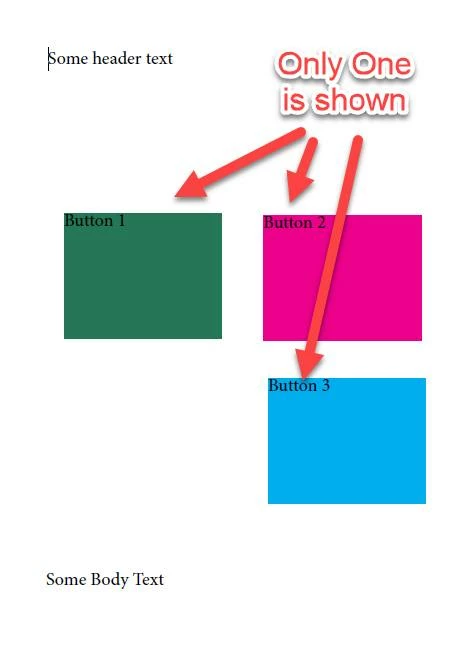
I hope somebody has good news for me on this... Got a client that likes interactive PDFs and has created a document where you can click to change the color of an item. (essentially its like project status) In the simplified example the buttons are next to each other however in their version they are stacked and only one is shown at a time. They click the button to cycle through statuses.
 
I've only told them that i can make this "as accessible as possible". They are okay with a compromise as this is a stop gap until we do an ADA website. curious what my options are...
Listening to this document in NVDA (screen reader) shows me that even the hidden buttons get read :-<


Note that is says "status green, status red, status blue" even though its currently set to red (yeah i know thats pink but this is just an example haha)
Clicking the button hides that button and shows another.
Here is an image if you need to see what i'm talking about.
 
Basically, i'm looking for ideas on a reasonable accessible compromise without sacrificing the non-accessible experience.   Will need to pass PAC 2021 checker when i'm done...
 
This topic has been closed for replies.

3 replies

Inspiring
October 16, 2023

Looks like all i needed to do was enable layers on export (in adobe indesign) for the behavior to work as expected with the screen reader..... hopefully PAC 2021 checker doesn't hate me for it. (If it does blow up i'll update this thread). Here is a link to a pdf  i generated that has two of these such buttons as a proof of concept.  (attached preview version won't opperate as expected unless you download) 


I'm going to leave this unsolved for now in case anyone else has additional insight but this looks like it will be my solution unless i hit another snag

Inspiring
October 17, 2023
Inspiring
October 17, 2023

Unmarked this as a solution because I just realized NVDA reads the hidden fields 😞

JR Boulay
Community Expert
Community Expert
October 16, 2023

You should use a dropdown menu to choose colors.

Acrobate du PDF, InDesigner et Photoshopographe
Inspiring
October 16, 2023

i'm ultimately going to consider both dropdowns and radio buttons as alternatives but those are all compromises that need to be further down my list of options (if i can even make one) because it changes the previously approved visual user experience... also i should mention, there are 48 of these buttons crammed into an already cluttered page..


Inspiring
October 16, 2023

looks like the pdf isn't interactive when you click the preview button.

heres a dropbox link to the same file.  (only is interactive in acrobat NOT apple preview)

https://www.dropbox.com/scl/fi/jiywx7w5yuwgbgo3t8dyz/buttonTrialConverted.pdf?rlkey=zouuttjlk361kihqom3r6eewq&dl=0