Participant
April 12, 2018
Question

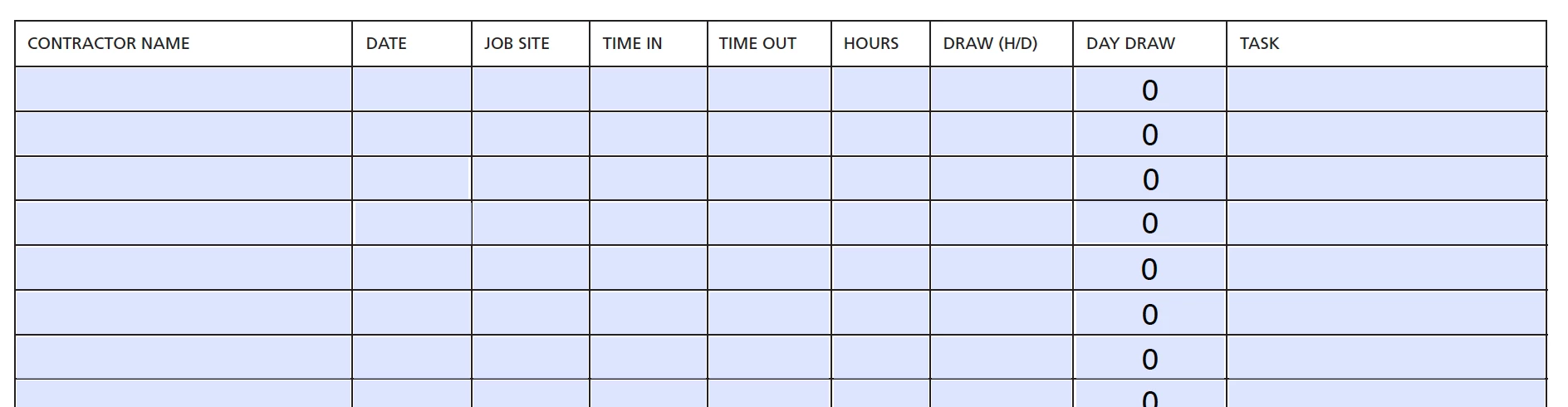
Is there a way to calculate hours worked on a fillable where one field says "TIME IN", the other says "TIME OUT" then it would automatically calculate the hours in the next "HOURS" field
  • April 12, 2018
  • 1 reply
  • 529 views

I was able to get the "HOURS" field to multiply the "DRAW (H/D)" field, which gives the "DAY DRAW" field total, but it would be nice to get the TIME IN/TIME OUT TO calculate the number of hours

This topic has been closed for replies.

1 reply

try67
Community Expert
Community Expert
April 12, 2018

Certainly, but time calculations in JS are quite complex.

See these tutorials about the subject:

https://acrobatusers.com/tutorials/working-with-date-and-time-in-acrobat-javascript

https://acrobatusers.com/tutorials/working-with-date-and-time-in-acrobat-javascript-part-2

https://acrobatusers.com/tutorials/working-with-date-and-time-in-acrobat-javascript-part-3

I've developed a script that can help you set up this kind of calculation very easily, without having to write any code yourself.

You can find it here: Custom-made Adobe Scripts: Acrobat -- Calculate Time Differences in a Worksheet