
October 11, 2017
Answered

Is there a way to get the printer to automatically recognise the page orientation for double sided printing?
  • October 11, 2017
  • 1 reply
  • 3778 views

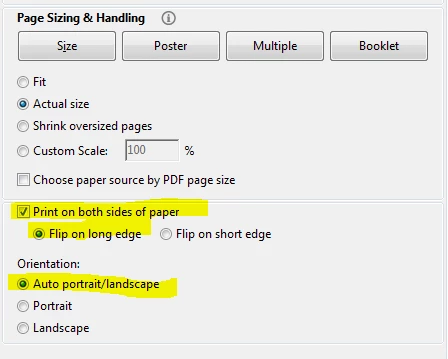
My PDF (700 pages) contains a mix of portrait and landscape pages. When reading double sided printing in a folder, pages in portrait format flip on the long edge, and pages in landscape flip on the short edge. So when you get to a landscape page, the text on page 2 prints upside down. When printing, we can only select long edge or short edge for the double sided option. Is there a way to get the printer to automatically recognise the page orientation for double sided printing?

This topic has been closed for replies.
Correct answer Abambo

Your printer does recognize the page orientation, as it does a autorotate.

Unfortunately, there is no option to change the "flip on edge" according to the page orientation. I suppose the orientation is done accordingly to be more readable on screen.

You have 2 possibilities (I assume that landscape is the exception):

  1. Changing the page orientation inside the PDF, so that all pages are correctly oriented (ie flipping landscape pages in portrait the way you want them being printed).
  2. Printing landscape and portrait page separately. That's only possible if all landscape pages are r/v pages.

1 reply

Abambo
Community Expert
AbamboCommunity ExpertCorrect answer
Community Expert
October 12, 2017

Your printer does recognize the page orientation, as it does a autorotate.

Unfortunately, there is no option to change the "flip on edge" according to the page orientation. I suppose the orientation is done accordingly to be more readable on screen.

You have 2 possibilities (I assume that landscape is the exception):

  1. Changing the page orientation inside the PDF, so that all pages are correctly oriented (ie flipping landscape pages in portrait the way you want them being printed).
  2. Printing landscape and portrait page separately. That's only possible if all landscape pages are r/v pages.
ABAMBO | Hard- and Software Engineer | Photographer
October 12, 2017

Hey there, thanks for taking the time to help me with that answer. Helpful!