
Participant
February 27, 2018
Answered

Is there a way to turn off page rotation prior to OCRing a scanned doc?

  • February 27, 2018
  • 1 reply
  • 1819 views

Didn't find the answers supplied very helpful.

Is there a way to turn off page rotation prior to OCRing a scanned doc? Adobe seem to automatically rotate pages.

I want to OCR a doc but keep portrait orientation.
This topic has been closed for replies.
Correct answer AnandSri

Hello Armands,

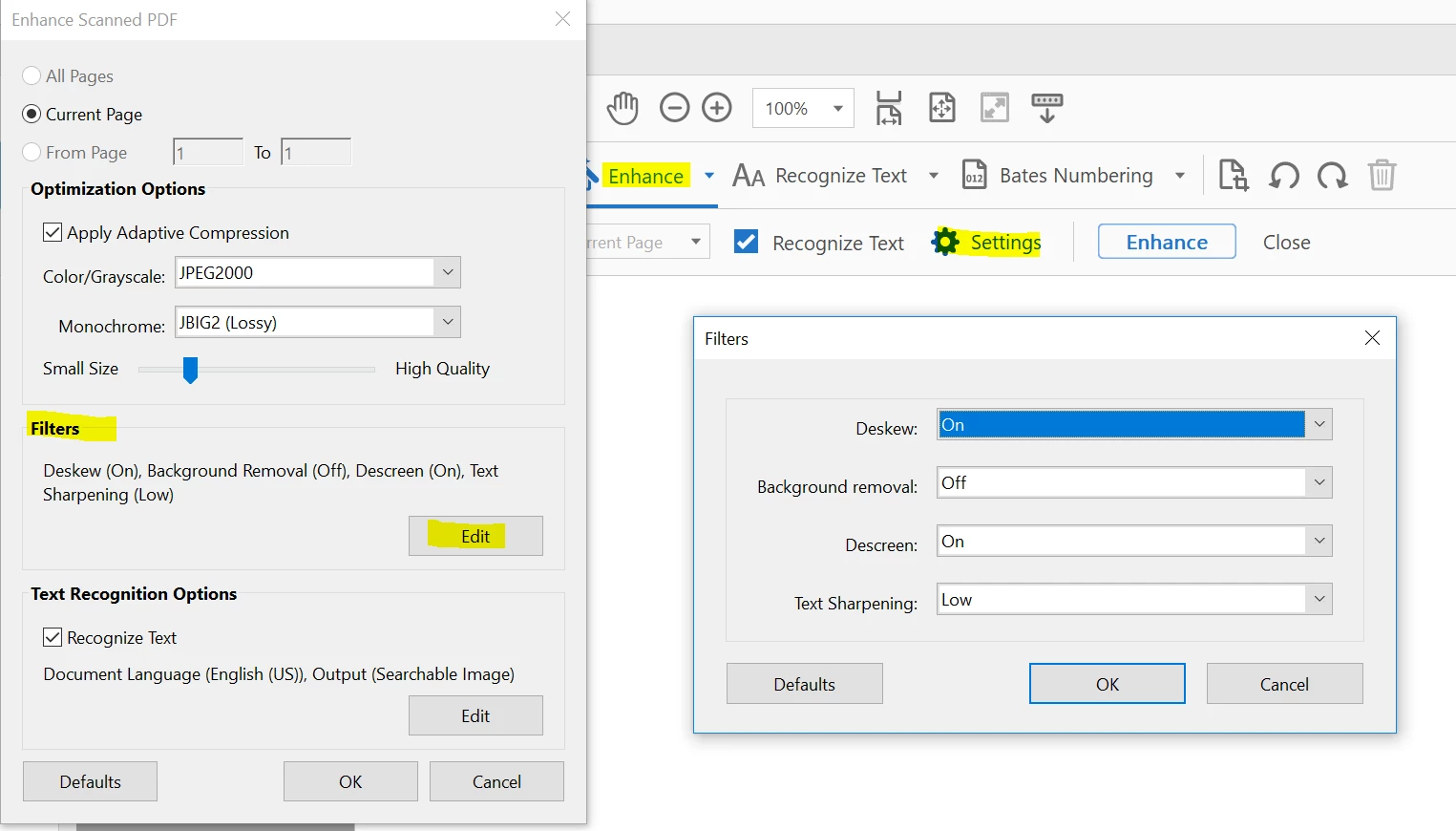
Sorry for the delayed response and inconvenience caused. Please change the settings under Enhance Scan>Settings>Choose Edit under Filters> and make changes in Deskew, Descreen.

You can also refer to the Adobe article Scan documents to PDF, Adobe Acrobat

Feel free to update this discussion for any further assistance.

Regards,

Anand Sri.

1 reply

AnandSri
AnandSriCorrect answer
Legend
April 9, 2018

Hello Armands,

Sorry for the delayed response and inconvenience caused. Please change the settings under Enhance Scan>Settings>Choose Edit under Filters> and make changes in Deskew, Descreen.

You can also refer to the Adobe article Scan documents to PDF, Adobe Acrobat

Feel free to update this discussion for any further assistance.

Regards,

Anand Sri.