kendrab91813504
Participant
October 9, 2017
Answered

Is there any way to make portfolios items movable as in order they are in?

  • October 9, 2017
  • 1 reply
  • 1198 views

I have multiple portfolios where a file or two will need to be updated at any given time, I use to be able to drag and drop the new file in to the portfolio and move where it needed to go in Adobe 10 as in order no matter what order I dropped them in there, new versions is Adobe Pro 11 I believe and I can no longer do what I use to be able to. Did Adobe remove this function or is there a setting I can change?
This topic has been closed for replies.
Correct answer Barb Binder

The way portfolios work is different than it used to be. Originally, they were created using Flash but since Flash has been retired, the portfolio feature has been redesigned. I already explained how to control the sort order above.

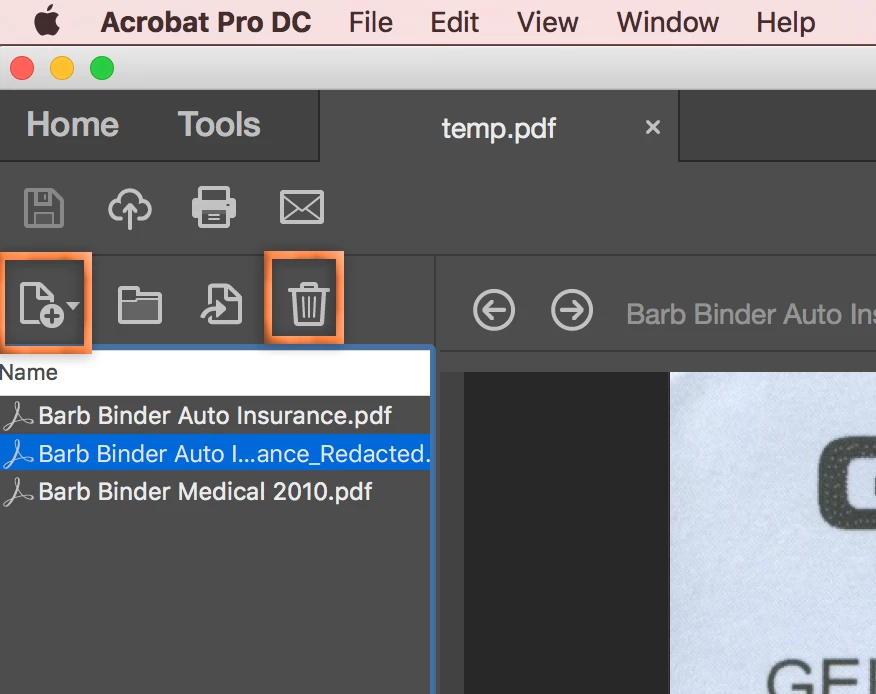
Still working in the left column, you can use the Add button to add files to an existing portfolio, and the Trash Can button to remove them. You can also drag and drop new files into the portfolio, as long as you relate the mouse over the left column.

For more information on these three features (changing order, adding and deleting files) see:

Create and customize PDF Portfolios

1 reply

Barb Binder
Community Expert
Community Expert
October 10, 2017

new versions is Adobe Pro 11 I believ

The current version is DC—which one are you using, XI or DC?

If DC, right-click the list of files in the left column > Portfolio Properties to change the sort order.

~Barb at Rocky Mountain Training
kendrab91813504
Participant
October 11, 2017

That doesn't do what I need it to do. I use to be able to edit my portfolios/binders by removing the file that was in there and dragging and drop the new version in the portfolio/binder and also reorder them as I needed them to be.

Barb Binder
Community Expert
Barb BinderCommunity ExpertCorrect answer
Community Expert
October 11, 2017

The way portfolios work is different than it used to be. Originally, they were created using Flash but since Flash has been retired, the portfolio feature has been redesigned. I already explained how to control the sort order above.

Still working in the left column, you can use the Add button to add files to an existing portfolio, and the Trash Can button to remove them. You can also drag and drop new files into the portfolio, as long as you relate the mouse over the left column.

For more information on these three features (changing order, adding and deleting files) see:

Create and customize PDF Portfolios

~Barb at Rocky Mountain Training