
yom91755153
Participant
December 18, 2018
Answered

Is This an Adobe Acrobat Message or has Malware Infected This Computer?

  • December 18, 2018
  • 2 replies
  • 3615 views

Hi, I'm the IT guy for a small business. We have about 25 computers with the Creative Cloud, and 10 computers with stand-alone (one time purchase) of Adobe Acrobat.

Recently, one of our computers showed this error/pop-up. Not sure if it's malware or if Adobe has messed up the serial number for our user...?

"A recent scan of your Adobe software has determined it is non-genuine. We're here to help fix it..."
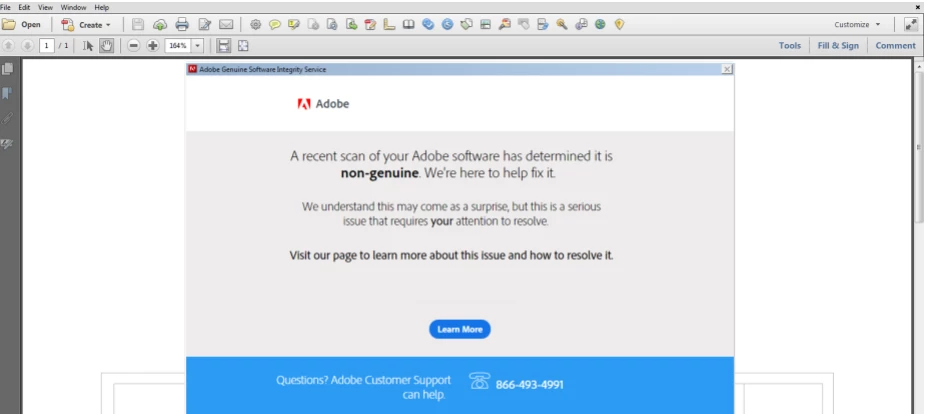
This user has had this exact computer for 3 years. The serial for Acrobat was purchased online from a reputable, authorized reseller. I purchased this myself, so I know there's been no 'funny business' with the license or the computer.

Since I know for a fact this is a legitimate copy of Acrobat, my first reaction was that this computer was infected. I ran several scans but found nothing. I didn't even consider it was a legit message from Adobe, because we don't use pirated software. Wasn't even in the realm of possibility.

I found this thread which mentions using the cleanup tool, but it seems it's only for the creative cloud...? (The copy of Acrobat in question is stand-alone)

Any ideas and suggestions are helpful. After 3 years for this computer, and probably 2 decades of being an Adobe customer, getting the pop-up message every time the user opens Acrobat is not good.

This topic has been closed for replies.
Correct answer Dov Isaacs

There is no question that such a message would be upsetting.

I most strongly recommend you contact Adobe Customer Care directly with all particulars (names with which the software was originally registered along with serial numbers, etc.) with regards to this type of issue. There may be an issue where overly-zealous anti-virus software is blocking Acrobat from ascertaining your license's validity (either blocking internet access or access to certain internal licensing files) or simply an installation that has been damaged somehow.

Since these forums are not direct Adobe Technical Support, there is nothing we can do here to fully assist you here.

          - Dov

2 replies

Dov Isaacs
Dov IsaacsCorrect answer
Legend
December 18, 2018

There is no question that such a message would be upsetting.

I most strongly recommend you contact Adobe Customer Care directly with all particulars (names with which the software was originally registered along with serial numbers, etc.) with regards to this type of issue. There may be an issue where overly-zealous anti-virus software is blocking Acrobat from ascertaining your license's validity (either blocking internet access or access to certain internal licensing files) or simply an installation that has been damaged somehow.

Since these forums are not direct Adobe Technical Support, there is nothing we can do here to fully assist you here.

          - Dov

- Dov Isaacs, former Adobe Principal Scientist (April 30, 1990 - May 30, 2021)
kglad
Community Expert
Community Expert
December 18, 2018

that looks genuine but as you know, that's unreliable.

using a browser that allows popups and cookies, contact adobe support during pst business hours by clicking here and, when available, click 'chat', https://helpx.adobe.com/contact.html