


Issue with bolded/unclear text and lines, and yellow tint
Hello there!
After an update to Acrobat DC, I am having issues with viewing PDFs. The issue is only with Acrobat DC, no other apps are affected. And it happens both on my laptop and monitor screens
They appear with a yellow tint, and the text is not clear – it is usually easier to view.

I can make the background white by selecting Preferences-Accessibility-Use Windows Color Scheme (as I had seen in another thread), but images, colours, and font is still not correct – the yellow haze still remains, and text is hard to read

I have tried editing options in Print Production and “Output Preview”, although this doesn’t do anything. And I have checked the graphics card options, and the resolution on my screens, but these are as they should be.
The symbols also appear to be double-lined or bolded in the UI:


I have uninstalled, removed all preferences, deleted all Acrobat DC files, then re-installed, but the issue still persists.
Here are my Preferences
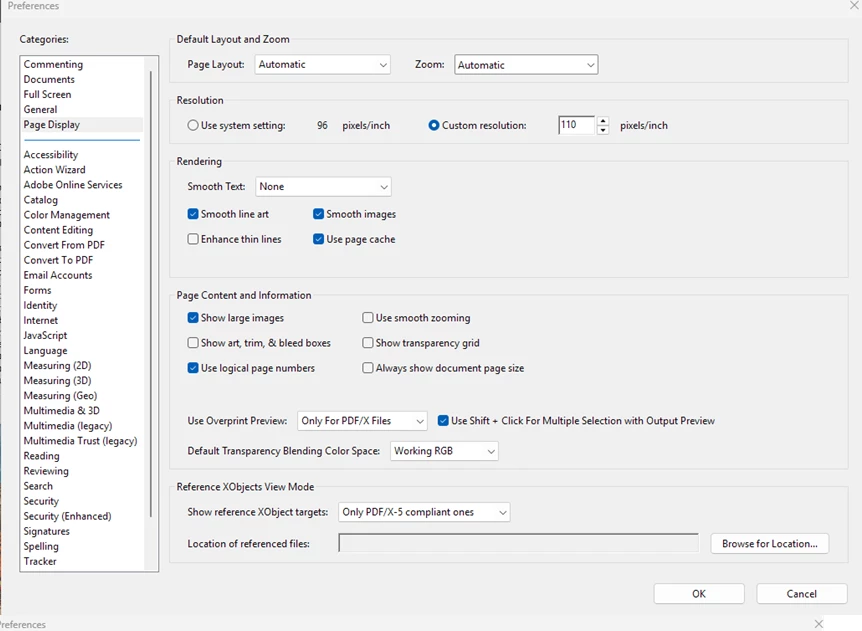
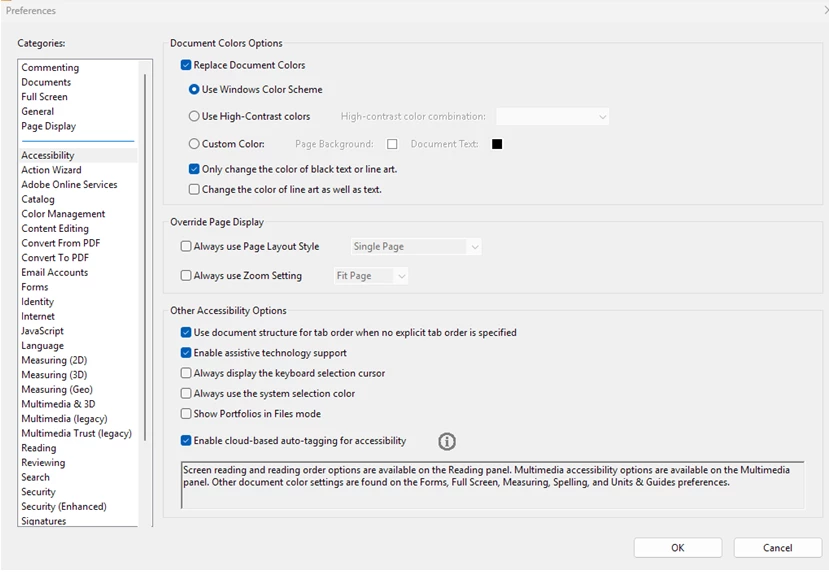
But no matter what I change in these, nothing seems to fix it.
Thank you in advance for any help
 AdChoices