November 22, 2025
Answered

Issue with editing text in Adobe Acrobat — text shifts or changes font automatically

  • November 22, 2025
  • 3 replies
  • 618 views

Hi everyone,
I’m facing an issue in Adobe Acrobat when trying to edit text in a PDF. Whenever I select the “Edit PDF” tool and update text, the formatting changes automatically — sometimes the font changes, spacing shifts, or the layout moves unexpectedly.

Has anyone experienced this problem? What’s the best way to edit text in Acrobat without affecting the existing formatting?
Also, is there a recommended method to preserve the original font if it’s not installed on my system?

Any suggestions would be appreciated.
Thanks!

Correct answer Randy Hagan

This can often happen if fonts in your PDF are subsetted, and you don't have the same font cuts loaded into your system (that's more specific than having "the same font" on your system).


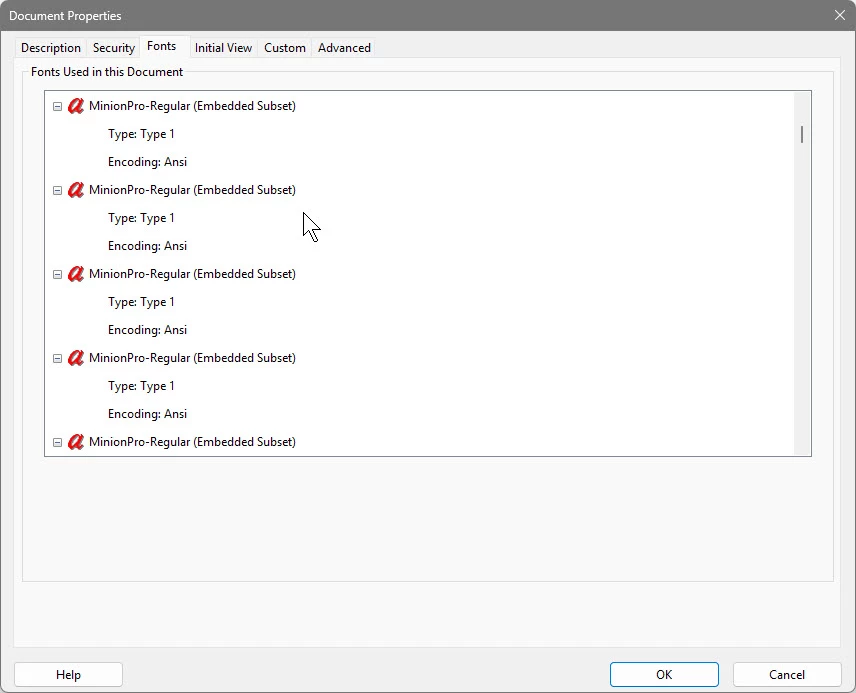
You can check quickly if you're on the verge of a world of hurt editing a PDF by using the File>Properties... menu command and clicking on the Fonts tab, as shown below:


865506i2F0657F7967706D7.jpg


Since I generated this PDF, I have the full font set and would have a fighting chance of editing it. But if I sent it to someone else who had nothing but an old version of Acrobat, they likely would be in a world of hurt.


Hope this helps,


Randy 


3 replies

lflegg
Inspiring
September 13, 2026

thank you - but what is the solution? If we’ve already received a file with fonts we can’t edit without the font changing, what can we do? 

Meenakshi Negi
Community Manager
Community Manager
September 14, 2026

Hi lflegg,


Thank you for reaching out.


If the fonts are not embedded, you can try to downloadling the required fonts and embed them to PDF. Please try the suggestion mentioned below:


1.Obtain and install the original font: This is the best solution to preserve the document's formatting. Ask the file creator to provide the font files or the name of the font used. If the font is available through Adobe Fonts, activate and install it through Creative Cloud before reopening Acrobat.


2.Request the source file: If possible, ask the sender for the original Word, InDesign, Illustrator, or other source document. Make the edits in the source application and then export a new PDF. This typically provides the most accurate results.


3.Use a replacement font: If the original font cannot be obtained, select a visually similar font and manually adjust spacing, line breaks, and formatting after editing. Acrobat allows you to set a specific fallback font under Preferences > Content Editing > Font Options to maintain greater consistency.


Hope this helps.


Thanks,

Meenakshi

Randy Hagan
Community Expert
Randy HaganCommunity ExpertCorrect answer
Community Expert
November 22, 2025

This can often happen if fonts in your PDF are subsetted, and you don't have the same font cuts loaded into your system (that's more specific than having "the same font" on your system).


You can check quickly if you're on the verge of a world of hurt editing a PDF by using the File>Properties... menu command and clicking on the Fonts tab, as shown below:


865506i2F0657F7967706D7.jpg


Since I generated this PDF, I have the full font set and would have a fighting chance of editing it. But if I sent it to someone else who had nothing but an old version of Acrobat, they likely would be in a world of hurt.


Hope this helps,


Randy