
Participant
August 30, 2020
Question

Issues opeing pdf files in Ms outlook by double clikcing or saved in pc

  • August 30, 2020
  • 1 reply
  • 1110 views

Dear Adobe ,


Please need your support as we faced issue in opening pdf documents saved in pc or in email attachments by double clicking it hangs no response and we chcked in task manager the adobe appilcation shows running with the Adobe Acrobat Update Service and Adobe Genuine Software Integrity Service but the pdf don't get opened .

Adobe Acrobat Reader DC  Version 20.012.20043 
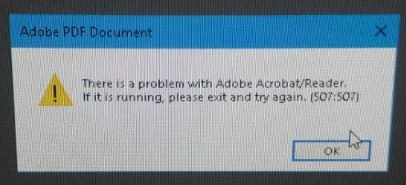


awaiting for your feedback

    This topic has been closed for replies.

    1 reply

    AkanchhaS8194121
    Legend
    August 31, 2020

    Hey!


    Thanks for sharing the screenshot of the error message. This screenshot says that there is a problem with Acrobat/Reader. If its running then please exit. Which means, Acrobat/Reader is running at the background but it doesn't let the document to be open up. In that case, we could suggest few steps that you can try on:


    • Reboot your system
    • Try to open the PDF file
    • Open Task manager>select Acrobat instances and close task
    • Does it open the file? If it doesn't then
    • Open Reader>Help>Repair Installation
    • Nothing works, then Navigate to Reader>Edit>Preferences>Security (Enhanced)>disable "Protected Mode at Startup" and "Enhanced Security">OK>Close Reader and reopen.

     Note: these changes are only for testing purpose. Once tested, please change it back to the previous setting. 


    Hope this helps.


    Thanks,

    Akanchha 


    Participant
    September 1, 2020

    HI  Akanchha,

    As per your steps provided disabling the Protected mode ate startup, closed the reader and reopeining it worked fine .

    we did it as test in one pc it worked fine but this will lesser the secuirty for the document if its recieved through email from external sources.Can't implement as permemnt solution.


    Thanks