


cmvarga5
Known Participant
November 24, 2025
Question

Issues with scoping a table ("Table cell has no associated subcells")

  • November 24, 2025
  • 1 reply
  • 356 views

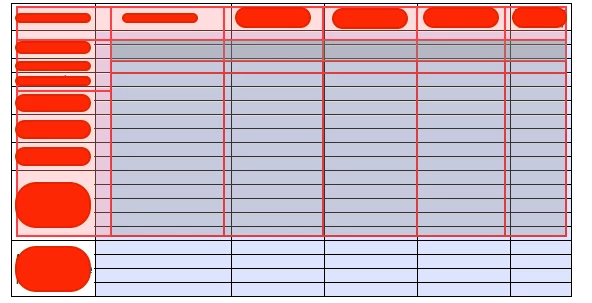
I keep getting this failure on PAC. I do not understand how this table is doing this when I scope my table. Is there a quick fix to solving this issue?

1 reply

Meenakshi_Negi
Legend
November 25, 2025

Hi cmvarga5,


Thank you for reaching out, and sorry for the trouble caused.


Please share more information on what you are trying here and the issue you are experiencing. Are you receiving any errors when opening a PDF in Acrobat? How did you create the PDF and the table? 

It would be helpful if you could share the screen recording of what happens.


Thanks,

Meenakshi

cmvarga5
cmvarga5Author
Known Participant
November 25, 2025

Unfortunately, I cannot share the actual table as it could be a privacy breach with my company, hence the blocked words.

In the screenshot, it shows that the individual rows are grouped together when I scope. I believe this is what was causing the failure. The rows are data cells that belong to the merged Table Header rows to the left. Instead of them being tagged as individual data cells, they are one big single data cell (hope that makes sense).

Meenakshi_Negi
Legend
November 26, 2025

Hi cmvarga5 ,


Thank you for the information.

As you cannot share the same PDF, you can share a sample PDF. Please try creating a test file and add a table in the same way, and see if you experience the same behaviour. You can share that PDF with us. It would be helpful if you could share a short video showing how the table was initially created and what happens when you open the file in Acrobat. The information will help us to understand and replicate the behaviour. 


Thanks,

Meenakshi