Known Participant
December 13, 2023
Answered

It's possible to enable the dropdown menu it text field isn't empty

  • December 13, 2023
  • 1 reply
  • 488 views

Hi, 

i have :

* dropdown list with 4 values (  ,A,B,C) and named is : Produit

One text field with the named : Nserie

One other dropdown list with 4 Values (   ,X,Y,X) ans named : Langue
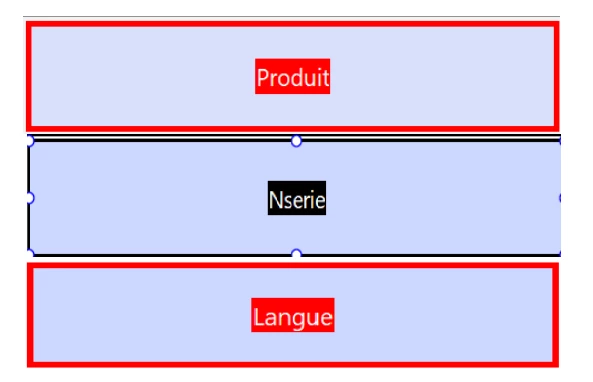


* when the firt dropdown is empty, the textfied and the other dropdown is hidden. ( i do it)

* if i select one value to the first dropdown, the textfield is enable.( i do it)

* if i put the text in the textfield and click anywhere on the form, the dropdown is visible and if i delete the text and press Enter or click anywhere. ( i do it)


But, 

so I'd like to know if it's possible to make it so that when I start typing in the textfield, the dropdown is automatically activated without me clicking anywhere else in the document?


This topic has been closed for replies.
Correct answer try67

Yes, it's possible, but a bit tricky. You would need to use the Keystroke event of the text field for that.

You'll find it under Properties - Custom - Format. Apply the following code there:


var dropdownField = this.getField("Langue");
if (AFMergeChange(event).length==0) {
	dropdownField.display = display.hidden;
	dropdownField.value = dropdownField.defaultValue;
} else dropdownField.display = display.visible;


NOTE: The code will likely "disappear" after you enter it and the Format setting will revert to None. This is a bug (of sorts) in Acrobat. The code was accepted and should still work, even though you can't see it. Just click Close and try entering text into the text field.

1 reply

try67
Community Expert
try67Community ExpertCorrect answer
Community Expert
December 13, 2023

Yes, it's possible, but a bit tricky. You would need to use the Keystroke event of the text field for that.

You'll find it under Properties - Custom - Format. Apply the following code there:


var dropdownField = this.getField("Langue");
if (AFMergeChange(event).length==0) {
	dropdownField.display = display.hidden;
	dropdownField.value = dropdownField.defaultValue;
} else dropdownField.display = display.visible;


NOTE: The code will likely "disappear" after you enter it and the Format setting will revert to None. This is a bug (of sorts) in Acrobat. The code was accepted and should still work, even though you can't see it. Just click Close and try entering text into the text field.

Known Participant
December 14, 2023

Thanks @try67   it's okay.