Known Participant
September 26, 2023
Answered

Javascript code for a text box that only allows specific format numerically

  • September 26, 2023
  • 4 replies
  • 2125 views

Hi all!


I am tryin to make a specific text box on an adobe acobat form be a specific format and only populate numbers. I need the text box to format as xx-xxxxx for a Bankruptcy Case Number. The text field needs to be able to change for multiple numbers. For example, if I need the text field to be 12-34567 and then the next time I compete the form I need it to say 98-76543. If I were to type anything other than this format, the text box won't populate - this would also include any letters that are typed, the text box would won't populate. Only format acceptable is xx-xxxxx. The dash must auto populate as well. 


Thanks for you help!
This topic has been closed for replies.
Correct answer JR Boulay

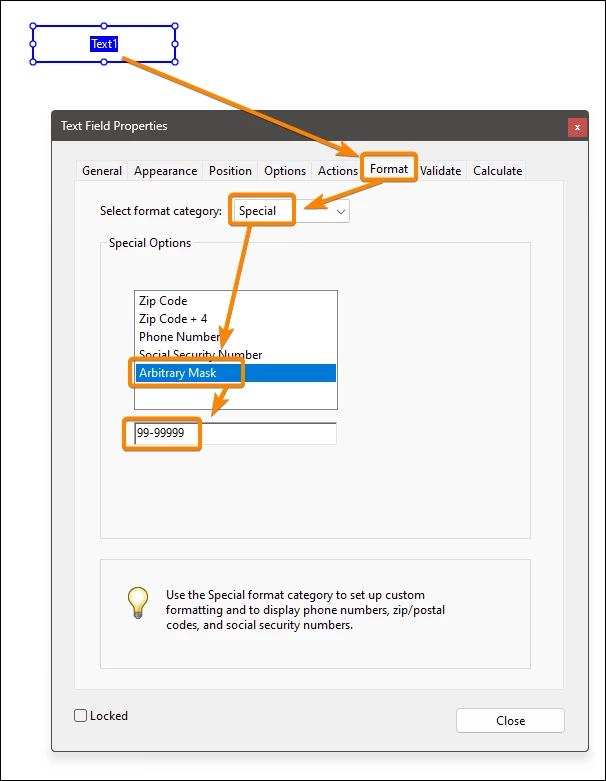
The simplest way is to use an Arbitrary Mask:


4 replies

JR Boulay
Community Expert
Community Expert
September 27, 2023

"Is there a way to change the warning pop-up box? "

No, this requires to use a format function in JavaScript

Acrobate du PDF, InDesigner et Photoshopographe
JR Boulay
Community Expert
Community Expert
September 27, 2023

"It still lets me type in letters and doesnt format to xx-xxxxx"

This is normal, Amal.'s script doesn't format the value.

Acrobate du PDF, InDesigner et Photoshopographe
JR Boulay
Community Expert
JR BoulayCommunity ExpertCorrect answer
Community Expert
September 27, 2023

The simplest way is to use an Arbitrary Mask:


Acrobate du PDF, InDesigner et Photoshopographe
Known Participant
September 27, 2023

@JR Boulay  this worked perfectly! thanks!


one follow-up question. Is there a way to change the warning pop-up box? For Example, instead of saying "The value entered does not match the format of the field = "99-99999" it would say "The value entered does not match the format of the field = "xx-xxxxx"


Amal.
Legend
September 26, 2023

Hi @gasperg62515419 


Hope you are doing well and thanks for reaching out.


Disclaimer: I want to clarify that I am not a JavaScript expert. Feel free to attempt implementing the provided code and assess its functionality for your specific situation.


// Get a reference to the text field by its name
var textField = this.getField("YourFieldName");

// Define a regular expression pattern for the allowed format (e.g., only digits and one decimal point)
var pattern = /^[0-9]+(\.[0-9]+)?$/;

// Add an event listener to the text field for user input
textField.setAction("Keystroke", function() {
// Get the current value of the text field
var value = event.value;

// Test the value against the pattern
if (!pattern.test(value)) {
// If the value doesn't match the pattern, clear the field
app.alert("Please enter a valid numerical format.");
event.value = "";
}
});


Make sure to replace "YourFieldName" with the actual name of your text field. This code will enforce that the text entered into the field matches the specified numerical format (digits with an optional decimal point). If the input doesn't match the pattern, it will display an alert and clear the field.


Hope it will help.


Regards

Amal

Known Participant
September 26, 2023
Thanks! As I am not a coder, I need to remove the text with the // -
correct?

And to confirm, the only part I need to update is "YourFieldName" with the
actual name of my text box?