
Participating Frequently
December 31, 2024
Answered

javascript for taking table information to use for calculations

  • December 31, 2024
  • 1 reply
  • 593 views

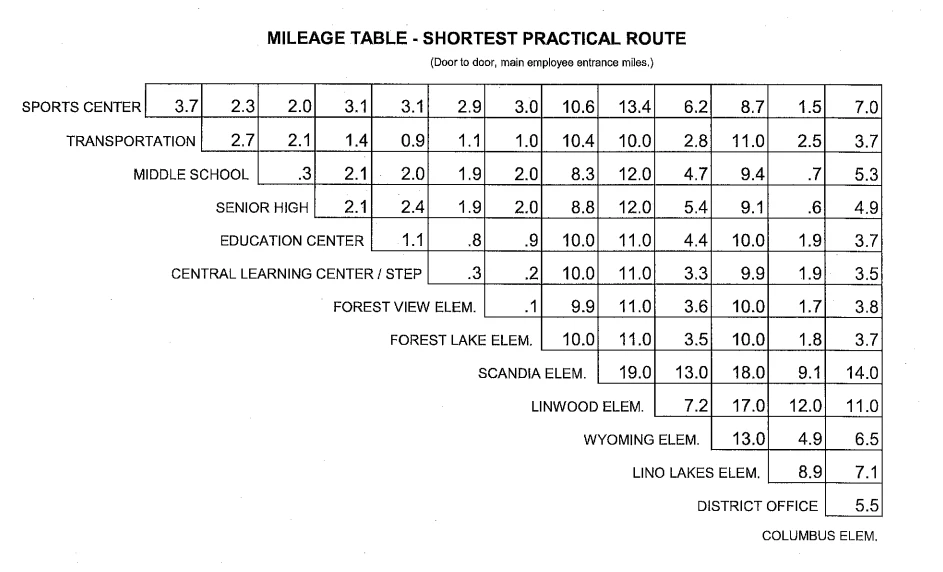
I'm creating a fillable form for mileage calculations. For example, I have a table for mileage: sports center to middle school is .3 miles, sports center to senior high 2.1 miles, etc. I want people to enter location to location, and the mileage gets entered automatically. I'm fairly new to Adobe and very green with javascript. I would appreciate help. thank you
 

Correct answer PDF Automation Station
  • Create 2 dropdowns which both contain all destinations ("SPORTS CENTER",  "TRANSPORTATION", etc.) and call them Location1 and Location2.  I developed a (paid for) tool that automates loading dropdown entries if you're interested. 
  • In the options tab of the dropdowns, check "Commit selected value immediately".
  • Enter the following custom calculation script in the mileage field:
var Loc1=this.getField("Location1").value;
var Loc2=this.getField("Location2").value;
if((Loc1=="SPORTS CENTER" && Loc2=="TRANSPORTATION")||(Loc1=="TRANSPORTATION" && Loc2=="SPORTS CENTER"))
{event.value=3.7} else
if((Loc1=="SPORTS CENTER" && Loc2=="MIDDLE SCHOOL")||(Loc1=="MIDDLE SCHOOL" && Loc2=="SPORTS CENTER"))
{event.value=2.3} else
if((Loc1=="SPORTS CENTER" && Loc2=="SENIOR HIGH")||(Loc1=="SENIOR HIGH" && Loc2=="SPORTS CENTER"))
{event.value=2.0} else
//continue pattern...
else
{event.value=""}


1 reply

PDF Automation Station
Community Expert
Community Expert
December 31, 2024
  • Create 2 dropdowns which both contain all destinations ("SPORTS CENTER",  "TRANSPORTATION", etc.) and call them Location1 and Location2.  I developed a (paid for) tool that automates loading dropdown entries if you're interested. 
  • In the options tab of the dropdowns, check "Commit selected value immediately".
  • Enter the following custom calculation script in the mileage field:
var Loc1=this.getField("Location1").value;
var Loc2=this.getField("Location2").value;
if((Loc1=="SPORTS CENTER" && Loc2=="TRANSPORTATION")||(Loc1=="TRANSPORTATION" && Loc2=="SPORTS CENTER"))
{event.value=3.7} else
if((Loc1=="SPORTS CENTER" && Loc2=="MIDDLE SCHOOL")||(Loc1=="MIDDLE SCHOOL" && Loc2=="SPORTS CENTER"))
{event.value=2.3} else
if((Loc1=="SPORTS CENTER" && Loc2=="SENIOR HIGH")||(Loc1=="SENIOR HIGH" && Loc2=="SPORTS CENTER"))
{event.value=2.0} else
//continue pattern...
else
{event.value=""}


lori_9412Author
Participating Frequently
January 8, 2025

Thank you so much for your help. I'll let you know if I need further help with this. 


Have a great day!