
Participant
May 12, 2022
Answered

Javascript help!!!

  • May 12, 2022
  • 1 reply
  • 2599 views

Hello Community!


I am looking to create a script that will run like an IF Function. If someone chooses option "A" in form dropdown field 1, then specific results will become available in form dropdown field 2.


If someone chooses option "B" in form dropdown field 1, then a new set of results will become available in form dropdown field 2.
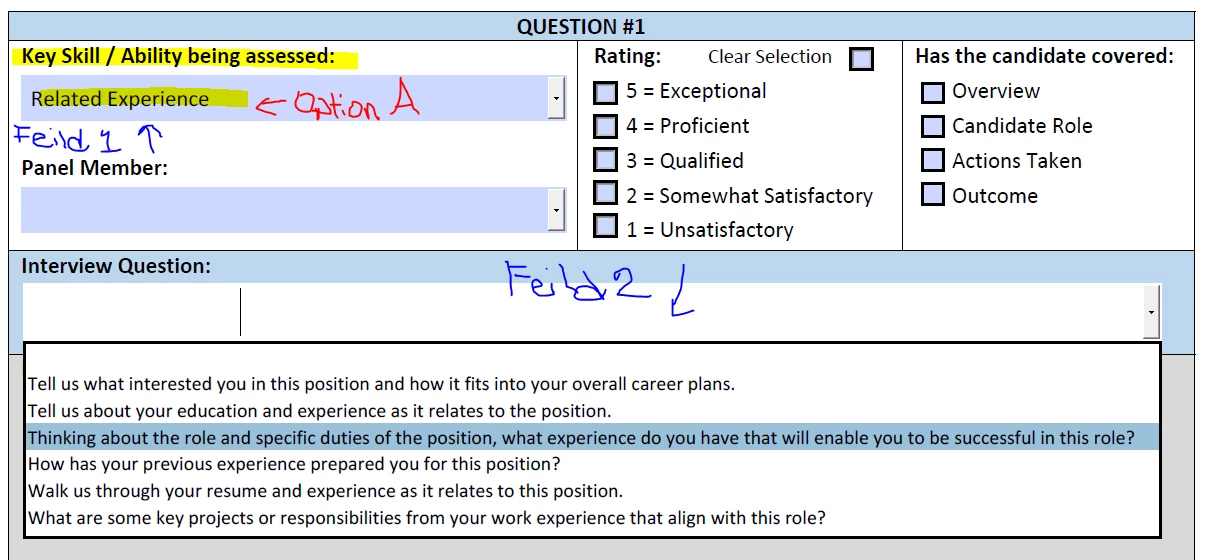


Thank you in advance!!!

This topic has been closed for replies.
Correct answer try67

As the custom Validation script of the first field you can enter something like this:


var field2 = this.getField("Dropdown2");
if (event.value=="Option A") field2.setItems(["A", "B", "C"]);
else if (event.value=="Option B") field2.setItems(["D", "E", "F", "G"]);


Note that JS is case-sensitive, so make sure you spell the field and value names EXACTLY as they appear in your file.

1 reply

try67
Community Expert
try67Community ExpertCorrect answer
Community Expert
May 12, 2022

As the custom Validation script of the first field you can enter something like this:


var field2 = this.getField("Dropdown2");
if (event.value=="Option A") field2.setItems(["A", "B", "C"]);
else if (event.value=="Option B") field2.setItems(["D", "E", "F", "G"]);


Note that JS is case-sensitive, so make sure you spell the field and value names EXACTLY as they appear in your file.

Participant
May 13, 2022

Thank you for the reply- especially so quickly! Any chance you can dumb it down for me??? step by step?

try67
Community Expert
Community Expert
May 13, 2022

In Prepare Form mode, go to the Properties of the drop-down field, and under the Validation tab paste this code in the third option ("Custom Validation Script"), after adjusting the field names and/or values in it, as needed.

Also, tick the option to commit the selected value immediately under the the Options tab, and you're all set!