


Participant
January 10, 2020
Answered

Javascript Help for calculation in a fillable PDF

  • January 10, 2020
  • 2 replies
  • 3229 views

Hi! I am needing some help. I am not Javascript savvy .. 
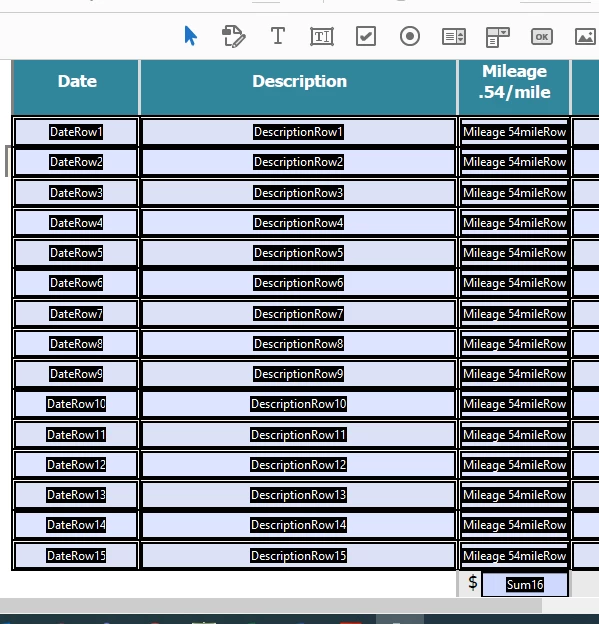
I am creating a fillable PDF in Adobe Acrobat PRO DC. I am needing to calculate one column so that everything in the 15 rows(milage 54milerow1, milage 54milerow2, milage 54milerow3, etc) is multiplied by .54 and then totaled at the bottom in Sum16... Can someone help me with this?

This topic has been closed for replies.
Correct answer try67

You can use this code as the custom calculation script of Sum16:


var total = 0;
for (var i=1; i<=15; i++) total+=Number(this.getField("Milage 54mileRow"+i).valueAsString);
event.value = total * 0.54;

2 replies

minordnsAuthor
Participant
January 10, 2020

Thank you! Is there anything I need to change/add in this? Or should I be able to just copy and paste? I went into the properties of Sum16, went to calculate and pasted the code under custom calculation script but it's not doing anything. 

try67
Community Expert
Community Expert
January 10, 2020

You don't need to change anything. However, you do need to change the value of one of the fields for it to "kick in".

If it's still not working press Ctrl+J and check if there are any error messages in the window that opens.

minordnsAuthor
Participant
January 10, 2020

This is what I am getting back. 


try67
Community Expert
try67Community ExpertCorrect answer
Community Expert
January 10, 2020

You can use this code as the custom calculation script of Sum16:


var total = 0;
for (var i=1; i<=15; i++) total+=Number(this.getField("Milage 54mileRow"+i).valueAsString);
event.value = total * 0.54;