
Participating Frequently
December 11, 2023
Question

Javascript syntax error - moving pages

  • December 11, 2023
  • 2 replies
  • 3695 views

Hello, I try to add a script for movin pages in Acrobat Pro and still get a syntax error. It should take the first page of the second half of the document and put it behind the first page of the first half of the document, the second one from the second half behind the second from the first half etc.

Could someone look at the script and tell me what is wrong with it, please? Thank you.


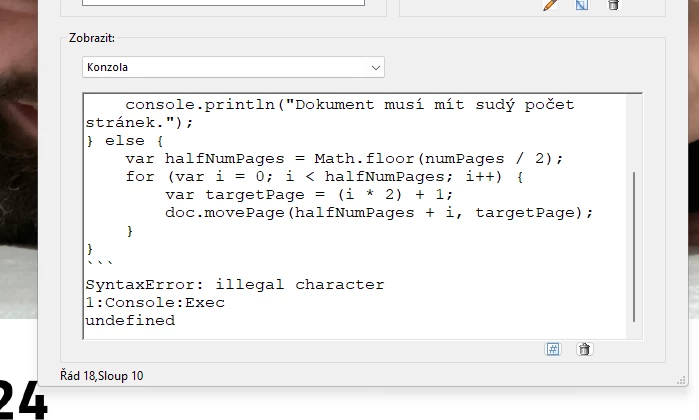
```javascript

var doc = this;

var numPages = doc.numPages;


// Ověření, že celkový počet stránek je sudý

if (numPages % 2 !== 0) {

    console.println("Dokument musí mít sudý počet stránek.");

} else {

    var halfNumPages = Math.floor(numPages / 2);

    for (var i = 0; i < halfNumPages; i++) {

        var targetPage = (i * 2) + 1;

        doc.movePage(halfNumPages + i, targetPage);

    }

}

```


This topic has been closed for replies.

2 replies

Bernd Alheit
Community Expert
Community Expert
December 11, 2023

The characters at

  ```javascript

are illegal.

BDA111Author
Participating Frequently
December 11, 2023

Thank you, but I get a syntax error on the second row as well, the text "var doc = this;" is illegal too according to it.

Bernd Alheit
Community Expert
Community Expert
December 11, 2023

What error message does you get?

jane-e
Community Expert
Community Expert
December 11, 2023

@BDA111 


I've moved your post to the Adobe Acrobat Pro forum and added the topic "JavaScript" for you.


Jane

BDA111Author
Participating Frequently
December 11, 2023

Thank you!

jane-e
Community Expert
Community Expert
December 11, 2023

You're welcome @BDA111 , we are happy to move posts to the place where they are most likely to get help. Welcome to the Community Forums!

Jane