
Javascript that prints current file to Adobe PDF
I run a MailMerge add-in (Evermap) that generates a multiple page document using a PDF form template populated with data from an Excel workbook. The add-in saves the merged file in a directory I designate ("C:\MyStuff") with a name like "SAPLabels_Richard Warner_Agro-K R&D_2022CORNIARF601.pdf". This document consists of multiple pages, one page for each record merged - so 4 records = 4 pages.
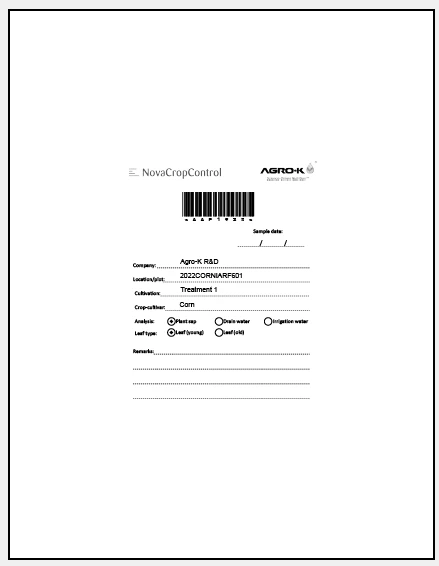
After the MailMerge finishes, I want to execute a javascript that prints the document to Adobe PDF, formatted to print multiple pages per sheet (2x2), and save it with the same filename, but to a different directory "C:\MyStuff\PDFlabels". 4 pages / sheet.
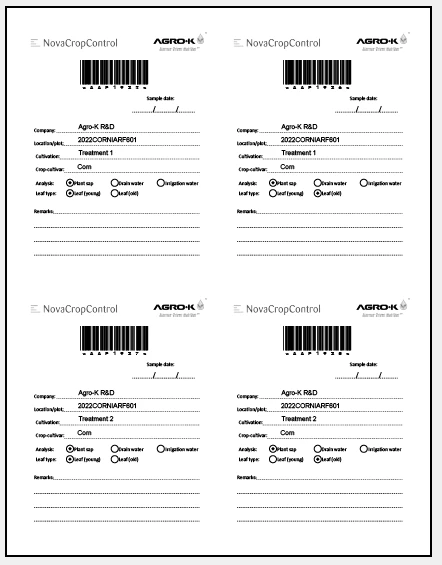
My goal is to reduce the file size. printing to Adobe PDF from Acrobat accomplishes that, but I'm very open to other approaches that achieve the same outcome.
On top of that, I'm unfamiliar with javascript, so any and all advice would be sincerely appreciated.
 AdChoices