


Participant
August 12, 2025
Answered

Je ne trouve pas le type de champs Nombre dans un formulaiire

  • August 12, 2025
  • 2 replies
  • 230 views

Bonjour

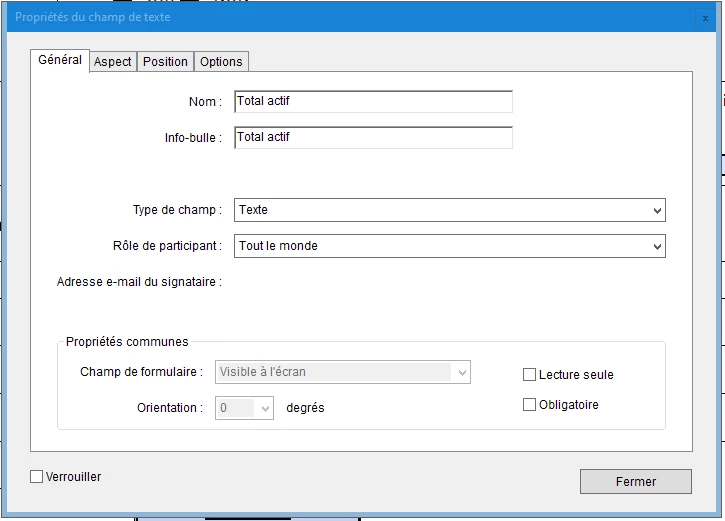
Je n'arrive pas à trouver le type de champs "Nombre" dans un formulaire, j'ai texte, adresse, fonction,... mais pas Nombre

Une idée de comment le faire apparaitre?

Merci de votre aide

Cordialement

Guillaume


Correct answer try67

If you're using the old Acrobat UI, click on Tools - Prepare Form and then on "More" at the right-hand side of the window and then on "Revert to Acrobat Form".

If you're using the new Acrobat UI go to Tools and search for "Prepare Form", then click the "three dots" icon next to "Prepare a Form" on the left-hand panel and then on "Remove e-signing options".

In the future, when creating the form for the first time do not tick the box that says "This document requires signatures", as it converts it to an Adobe Sign form, which has limited functionality.

2 replies

try67
Community Expert
try67Community ExpertCorrect answer
Community Expert
August 12, 2025

If you're using the old Acrobat UI, click on Tools - Prepare Form and then on "More" at the right-hand side of the window and then on "Revert to Acrobat Form".

If you're using the new Acrobat UI go to Tools and search for "Prepare Form", then click the "three dots" icon next to "Prepare a Form" on the left-hand panel and then on "Remove e-signing options".

In the future, when creating the form for the first time do not tick the box that says "This document requires signatures", as it converts it to an Adobe Sign form, which has limited functionality.

Participant
August 14, 2025

Hello

Thank you for your response

It works!

Legend
August 12, 2025

Hi William, 


Thanks for reaching out. You can use a Text field. Under Text Field properties > choose Format. Change the properties as required. 

You can also use JavaScript for regular expressions under the Action tab(Adobe doesn't provide support for JavaScript). 


Let us know how it works.


Best regards,
Tariq | Adobe Community Team

Participant
August 12, 2025

Perhaps but i don't have "Actions" "Validate" and "calculate"

How to make them appear in my acrobat pro?
