
Participating Frequently
May 19, 2021
Question

jpg to fillable pdf form (Win 10 and latest acrobat DC)

  • May 19, 2021
  • 2 replies
  • 1399 views

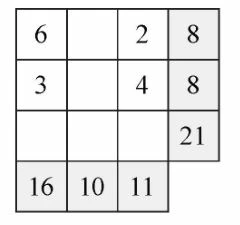
When i convert a jpg to a fillable pdf form, individual cells convert correctly, but adjacent cells in the same row are merged into one field. For ex. in the following table, in rows 1 & 2, there are two fields, but in row 3, I have only one field, the three cells are merged into one fillable field. Is there a way avoid this situation?
I have many math worksheets to prepare, and we want to avoid photocopies...
Any help or idea would be appreciated
This topic has been closed for replies.

2 replies

Nancy OShea
Community Expert
Community Expert
May 19, 2021

Converting JPGs to forms is hit & miss at best.


Nancy O'Shea— Product User & Community Expert
Participating Frequently
May 19, 2021

Thanks for your reply. Can I use any other type of file? can it give me some advantage??

Nancy OShea
Community Expert
Community Expert
May 19, 2021

Create your native form in MS Word, Excel or InDesign and convert it to PDF.  See links below for details:


Nancy O'Shea— Product User & Community Expert
try67
Community Expert
Community Expert
May 19, 2021

You can't, really. You have to adjust the fields manually. The fields detection wizard never does a perfect job.

Participating Frequently
May 19, 2021

Too bad.... more work for me.....but thanks anyway