
Jump to page: Terrible UX
I am a user that needs to constantly flip to specific pages in PDFs. In older versions of Acrobat when the page number appeared at the top menu bar, you used to be able to just double-click on the page number and just change it. Easy. Intuitive.
In newer versions, the page number has been nested into the narrow side column and it feels like the UI team went through gynmastics to re-implement the feature. To change a page number, you now have to click on the FAKE INPUT BOX, which then pops open a REAL input box off to the side, and then you have to move your mouse over to it, double-click/cmd+A the existing page number, and then key in the new number.
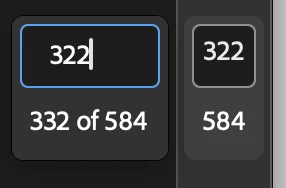
I don't understand how this update got approved for implementation. It's a core function of a PDF reader that previously took half a second to use, and now it's a 5-step Rube Goldberg of a process. It would be funny if it weren't such an annoying waste of time.
Please, please revert this. Or at least make it so that when you click on the fake input box, it highlights the number in the true input box, so users can just type in the number and be on their way.


 AdChoices