
OsakaWebbie
Inspiring
Mar 17, 2017 7:27 AM UTC
Answered

Keep comment list open, or hotkey?

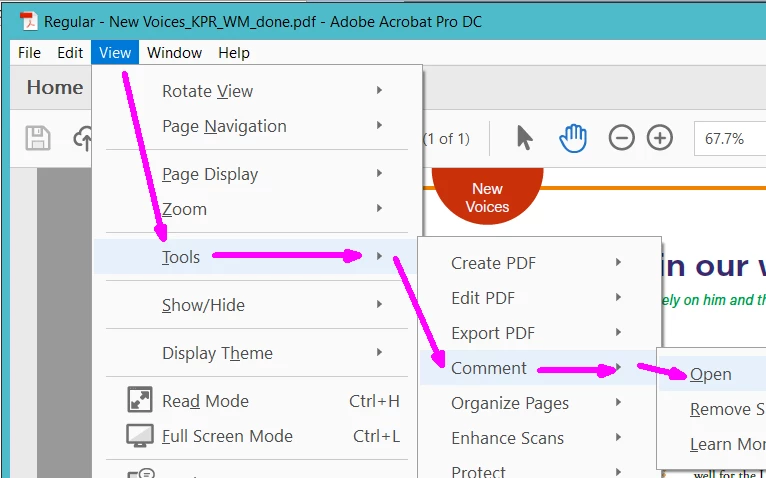
Can I get the Comments list to be open by default whenever there are comments in a document (or all the time, if conditional is too hard)? I open lots of documents that contain comments, and I always want to see the list, but it's annoying to always have to select View -> Tools -> Comment -> Open every time.

Or at least is there a way to set a hotkey for the opening of that pane? That would be better than a 4-layer-deep menu item.

This topic is closed to new replies. Start a new post to keep the conversation going.
try67
try67Correct answer
Community Expert
Mar 17, 2017 1:50 PM UTC

Which version were you expecting?

Anyway, if "look under Tools" means the menu item View -> Tools, then that's what I do now, but it gets tiresome:


I meant the Tools button next to Home, just above the toolbar and below the menu.

15 replies

try67
Community Expert
Community Expert
Mar 17, 2017 9:58 AM UTC

I don't think so, but why are you using this long route? Simply click the Comment button at the top-right hand side of the window and the panel will open, with the comments list at the bottom of it.

Translate
OsakaWebbie
Inspiring
Mar 17, 2017 11:58 AM UTC

There is no Comment button that I can find. This is a screenshot of Acrobat right after opening one of the files that has comments I want to read (each of those yellow highlights represents a comment from the proofreaders). What button are you referring to?

Translate
try67
Community Expert
Community Expert
Mar 17, 2017 12:44 PM UTC

Ah, it's Acrobat DC... Look under Tools, then.

Translate