


Participant
October 9, 2023
Answered

Keep getting Full Screen mode prompt every time I open a new PDF file.

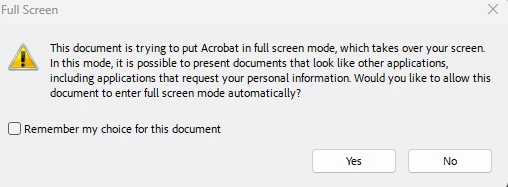
Since the Sept 2023 update, every time I open an Acrobat file, it gives me the following prompt, asking if I want to put it in Full Screen mode - which I never want to do. I have to check "Remember my choice for this document" and then "No" every single time. This is really frustrating because I typically have to re-export and save new pdfs multiple times (graphic design related) so remembering my choice for a pdf doesn't really work for me, as I typically have to overwrite the pdf multiple times.


Is there any way to make it so Acrobat stops asking me if I want to go full screen for every document? It's really frustrating. I've tried Preferences, General, Reset All Warnings, same with unchecking the options at the top of Preferences, Full Screen menu. Nothing has worked.



try67
try67Correct answer
Community Expert
October 9, 2023

Then you'll have to disable it for each file, under File - Properties - Initial View.

12 replies

Participant
November 13, 2025

I have the same issue, super annoying. WIndows 11, newest Acrobat DC. I deal with a lot of single-use PDFs from this one specific client, and the only choices Acrobat gives me is to A) Automatically open the document in full screen or B) Bother with the pop-up every time I open a document. Who at Adobe decided I wouldn't want them minimised? Please fix!

Translate
Participant
November 13, 2025

That is, continuous release version 2025.001.20844.0

Translate
try67
Community Expert
Community Expert
October 9, 2023

Under Preferences - Full Screen, tick off "Alert when document requests full screen".


Translate
Participant
October 9, 2023

But if I do that, it just automatically goes full screen for every document then. Which I don't want that either.

Translate
try67
Community Expert
try67Community ExpertCorrect answer
Community Expert
October 9, 2023

Then you'll have to disable it for each file, under File - Properties - Initial View.

Translate