
jilsyj7344317
Participant
December 16, 2020
Question

Korean characters in PDF are not converting when the PDF is saved as a Word file

  • December 16, 2020
  • 1 reply
  • 5791 views

Hi Team,


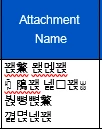
We have some Korean character data in our application. We can able to generate a PDF report for this data with the help of RDLC from our application. We can confirm that the same Korean data is reflecting in the PDF file. While opening this report in Adobe Acrobat Pro software and saving this as a Word Document, the Korean character data is not showing on that Word document. It shows some different Characters instead of Korean characters.

Could you help me in finding the cause for this issue?

Also please help to resolve on this problem.


Source data :
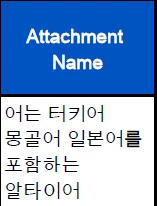
 

Data on Word file
 

Thanks in advance

This topic has been closed for replies.

1 reply

Bevi Chagnon - PubCom.com
Legend
December 16, 2020

Your fonts need to be embedded into the PDF.

Ideally, that should have been done when the PDF was created, but most likely wasn't.

And they must be Unicode / OpenType fonts to incorporate the Korean set of glyphs.


Refer to this similar post: https://community.adobe.com/t5/acrobat/need-help-with-acrobat-to-word-export-certain-paragraphs-are-converting-to-garbage/m-p/11682470?page=1#M290548


You'll need to:

  1. Exxamine the PDF and find out which fonts were used (File/Properties / Fonts tab), and which fonts are used in the text that is not conveying correctly.
  2. Get copies of those fonts on your computer. Make sure they are OpenType/Unicode versions, not old PostScript or old TrueType.
  3. Embed the fonts into the PDF; follow the instructions above.
  4. Then export as Word.docx from Acrobat.


|    Bevi Chagnon   |  Designer, Trainer, & Technologist for Accessible Documents ||    PubCom |    Classes & Books for Accessible InDesign, PDFs & MS Office |
jilsyj7344317
Participant
December 16, 2020

Hi Bevi,

Thanks for the quick response.

I had checked on the Font Tab and noted that there 5 types of Fonts used and 3 of them had the type of "TrueType" and the other 2 have the type "TrueType(CID)". Also noted that the Encoding is 'ANSI' for TrueType and 'Identity-H' for the TrueType(CID).

Is that causing the problem during the conversion?

Is there any workaround to fix the issue?

Bevi Chagnon - PubCom.com
Legend
December 16, 2020

ANSI is not UNICODE. And Unicode's purpose isspecifically to allow text in all languages to be accurately converted from one file to another, or one technology to another. Learn more about Unicode at www.Unicode.org It's an international standard for accommodating the world's languages, and was adopted worldwide by the computer industry in 2000.


Follow the instructions above. Thoroughly read the post I linked to.

There is no workaround. You need to correct the font problem before going any further. You have old fonts that are not Unicode, and therefore, can't convey the Korean characters.


|    Bevi Chagnon   |  Designer, Trainer, & Technologist for Accessible Documents ||    PubCom |    Classes & Books for Accessible InDesign, PDFs & MS Office |