bill1gill2
Participant
March 7, 2018
Answered

Language for numbers locked in Arabic

  • March 7, 2018
  • 11 replies
  • 75255 views

I'm working with Adobe Acrobat Pro DC. When editing documents, the default characters for numbers always give me Arabic numerals despite my English text. Even if I cut and paste standard English numerals, the result is having them converted into Arabic numerals. Hopefully there is a quick fix.

Regards,

Will

Correct answer Zaid Al Hilali

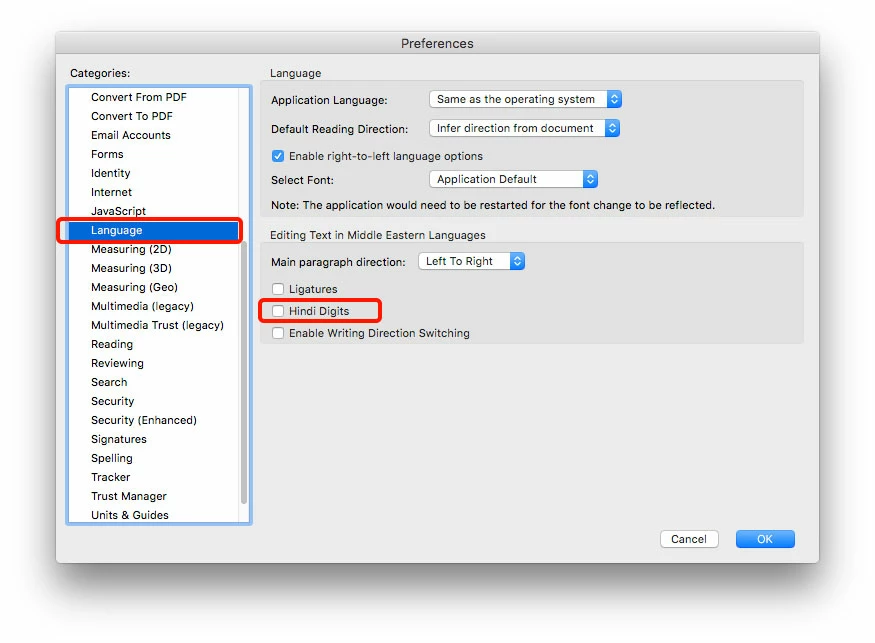
You may want to turn off (Uncheck) Hindi Digits in the Preferences > Language section. Let me know if this works for you.

11 replies

Zaid Al Hilali
Community Expert
Zaid Al HilaliCommunity ExpertCorrect answer
Community Expert
March 7, 2018

You may want to turn off (Uncheck) Hindi Digits in the Preferences > Language section. Let me know if this works for you.

Participant
August 8, 2020

Thanks so much. Your suggestion worked