



santhoshr29800103
Known Participant
April 28, 2026
Question

Layers not visible in Adobe Acrobat Pro 9.0

  • April 28, 2026
  • 2 replies
  • 37 views

Hi Adobe Community,

I’m facing an issue with layer visibility in PDFs and would appreciate your guidance.

I am creating a layered PDF using PDF/X-4 settings from Adobe InDesign 24. After generating the PDF, I tested it across different Acrobat versions:

  • In Acrobat 8, 10, 11, and DC – the layers are visible and function correctly in the Layers panel.
  • However, in Acrobat 9.0 – the layers are not displayed properly. Instead, it shows only “D (default configuration) – text only”, and none of the actual layers are visible.
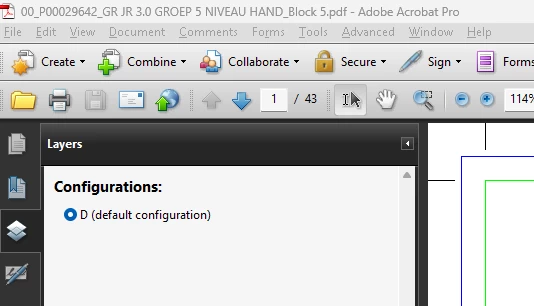
The PDF clearly contains Optional Content Groups (layers), and since it works in other versions, I assume the file itself is not corrupted.

Could you please help clarify:

  1. Is this a known limitation or bug in Acrobat 9.0 related to PDF/X-4 or layer handling?
  2. Are there any specific export settings in InDesign that improve compatibility with Acrobat 9?
  3. Is there any workaround to make layers visible in Acrobat 9 without flattening or removing them?

Any insights or recommendations would be greatly appreciated.

Thanks in advance!

Santhosh

    2 replies

    CorinneBazin
    Participant
    April 29, 2026

    This usually happens when the PDF doesn’t actually contain real layers. In many cases, what looks like layers is just objects stacked on top of each other, so Acrobat can’t display them in the Layers panel. It can also happen if the file was flattened or saved from another program that removed the layer structure.

    You can try opening the original file in the source application (like Illustrator or InDesign) and exporting it again with layers enabled. Otherwise, if the layers are already flattened, they unfortunately can’t be recovered inside Acrobat.

    Randy Hagan
    Community Expert
    Community Expert
    April 28, 2026

    Please excuse me for jumping in here with concerns, but how many clients do you have who use Acrobat 9? Adobe itself hasn’t supported the product since June 2013.


    I feel bad that I can’t answer your precise question, but that’s only because Acrobat 9 Pro is ancient history and nobody among my print production clients are using it anymore. I guess my question to you, like I saw in World War II-era cartoons when I was a kid in the ‘60s, would be: Is This Trip Really Necessary?


    Randy

    santhoshr29800103
    Known Participant
    April 29, 2026

    We are still using Acrobat 9 Pro for a few clients. As mentioned earlier, layers are fully supported in Acrobat 8 Pro, even though it is an older version compared to Acrobat 9 Pro. Logically, a newer version should retain or improve upon the features of the previous version. However, in this case, layers are working in the older version (Acrobat 8 Pro) but are not supported or visible in the newer version (Acrobat 9 Pro). Could you please clarify why this behavior occurs?


    Thanks,

    Santhosh

    Randy Hagan
    Community Expert
    Community Expert
    April 29, 2026

    I wish I could, but as I said I cannot. I don’t even have a system set up with Acrobat 9 Pro set up.


    Wish I could help, but I cannot. And Adobe will be no help, I’m afraid, because they’ve passed on to later versions of the software which don’t have this issue. Hopefully someone else around here may be able to lend a hand, but I wouldn’t bet on that.


    I wish I could help, 


    Randy