

cmvarga5
Known Participant
June 29, 2023
Answered

Limit Number field to Maximum Number and other character limit question

  • June 29, 2023
  • 1 reply
  • 929 views

I have 2 percentage fields. I use the number format instead for this instead of the percentage format option.


1) If one of the fields is only up to maximum of 5%, how do I set that up to that limit?

2) Second percentage field allowed up to 100%. So if I set the character limit to 3 characters, will it allow me to enter a decimal character? e.g. 50.75. For some reason, I am getting a rounded up number.


This topic has been closed for replies.
Correct answer try67

1) It's not clear what you mean. You want to limit the value of the field to only 0-5? If so, see #2.

2) Using a character limit is not a good idea. If you limit it to 3 digits they could still enter "567"...

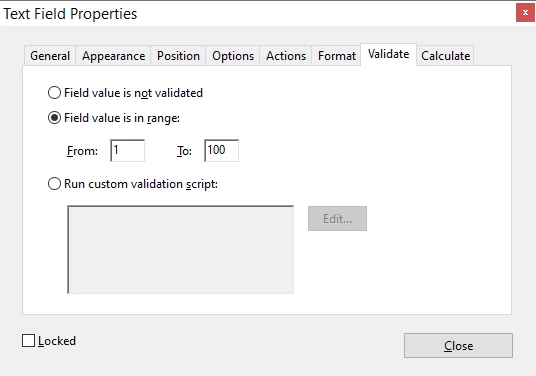
You can simply use the Range option in the Validate tab (since you've set the Format to Number) to only accept values between 0 and 100:


1 reply

try67
Community Expert
try67Community ExpertCorrect answer
Community Expert
June 29, 2023

1) It's not clear what you mean. You want to limit the value of the field to only 0-5? If so, see #2.

2) Using a character limit is not a good idea. If you limit it to 3 digits they could still enter "567"...

You can simply use the Range option in the Validate tab (since you've set the Format to Number) to only accept values between 0 and 100:


cmvarga5
cmvarga5Author
Known Participant
June 29, 2023

I have never used this before despite seeing it. Thank you so much!