Participant
December 7, 2017
Answered

Line weight changes after watermark

  • December 7, 2017
  • 1 reply
  • 698 views

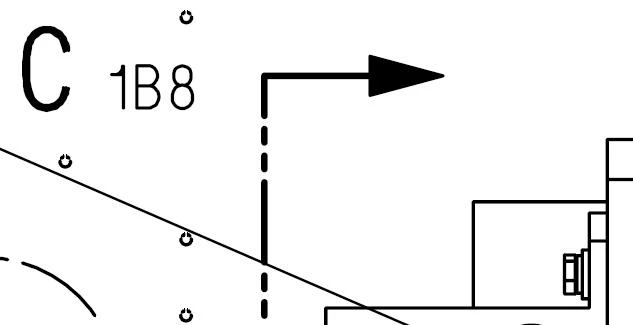
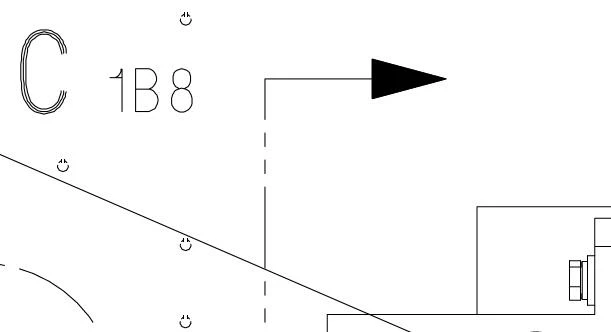
I have noticed that after adding a watermark using Adobe Acrobat Pro DC v2017.012.20098 that line weights change (see below).

This seems very strange - stamps, adding text, etc. does not seem to change the line weights.

Original image
After adding watermark
This topic has been closed for replies.
Correct answer Luke Jennings

You may have the Acrobat preference Enhance thin lines turned on. You may have flattened your PDF after adding the watermark and converted the strokes to outlines. The Enhance thin lines preference applies to lines only, which could explain the different appearances. If this is the case, you might be able to adjust the very thin lines in your PDF using Tools> Print Production> Fix Hairlines.

1 reply

Adorobat
Participating Frequently
January 17, 2018

HI Garyl,

Sorry for being late in answering your query.

Are you still facing this issue? If yes, could you let us know if using Text or an image/pdf file for watermark?

Have you tried adding watermark to a different pdf file to check if this is not related to this specific file only?

Also, try updating Acrobat to the latest patch and check if resolves the issue. Click "check for updates" under Help menu. You may also download updates manually using this link: DC Release Notes — Release Notes for Acrobat DC Products 

Thanks,

Shivam

Luke Jennings
Luke JenningsCorrect answer
Inspiring
January 18, 2018

You may have the Acrobat preference Enhance thin lines turned on. You may have flattened your PDF after adding the watermark and converted the strokes to outlines. The Enhance thin lines preference applies to lines only, which could explain the different appearances. If this is the case, you might be able to adjust the very thin lines in your PDF using Tools> Print Production> Fix Hairlines.