Inspiring
August 26, 2025
Question

Liniestärke CTRL + 5 im Standard umstellen

  • August 26, 2025
  • 1 reply
  • 416 views

Hi,


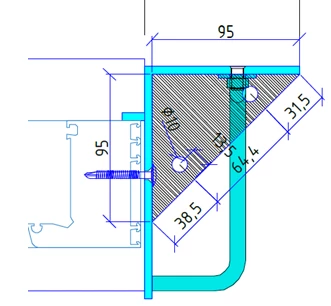
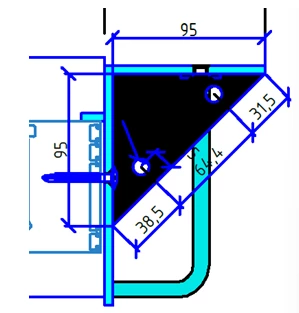
wir erstellen aus Zeichnung von CAD Programm pdf Dateien. In diesen PDF Dateien werden die Linien meist Fett dargestellt. Mit der Tastenkomi ctrl + 5 (Linien und Raster / Lininestärke) werden diese Linien sauber dargestellt. Unten zum Vergleich zwei Bilder.

Kann man diese Option im Standard umstellen, oder muss man dies in jeder PDF abschalten?


Danke und viele Grüße,

Martin


1 reply

Amal.
Legend
August 26, 2025

Hi there 


Hope you are doing well, and sorry for the trouble you are experiencing. 


The behavior you are seeing is related to "Enhance Thin Lines" in Acrobat/Reader. By default, Acrobat remembers this setting. If it is getting reset with every session of use, we need more information as below:


- Is this an issue with PDF file created from the Auto CAD application or with other PDFs as well, please try with different PDF files and check. 

- What is the version of the Acrobat Application you are using? Go to Help > About Acrobat and make sure its updated to the latest version 25.01.20643 Go to Help > Check for updates and reboot the computer once. You may also try repairing the installation from the help menu (Win Only) and reboot the computer and check.


Let us know how it goes. 


~Amal

martin_raAuthor
Inspiring
August 26, 2025

Hi Amal,


Thanks for your answer.


We print from AutoCad or IBSCAD.

We've tried Adobe to PDF, MS to PDF, and IBSCAD's internal PDF printer.


The "problem" is that the CTRL + 5 option is always enabled, which creates an image-like effect for CAD drawings.

Can this option be disabled by default?


We're currently using version 2025.001.20630. When I click on "Help me check for updates," it's no longer available.


Regards,

Martin

Amal.
Legend
August 26, 2025

Hi there 


Hope you are doing well and sorry to hear that, the issue still exists. 


Would you mind sharing a sample PDF file and a small video recording of the steps you are taking and the issue as it occurs so we can check it at our end.


Also, you may download the latest patch manually using the link https://adobe.ly/3JSoRFt 


~Amal