
Participant
February 20, 2024
Question

Link checkbox to pre-written text and delete text not selected

  • February 20, 2024
  • 2 replies
  • 411 views

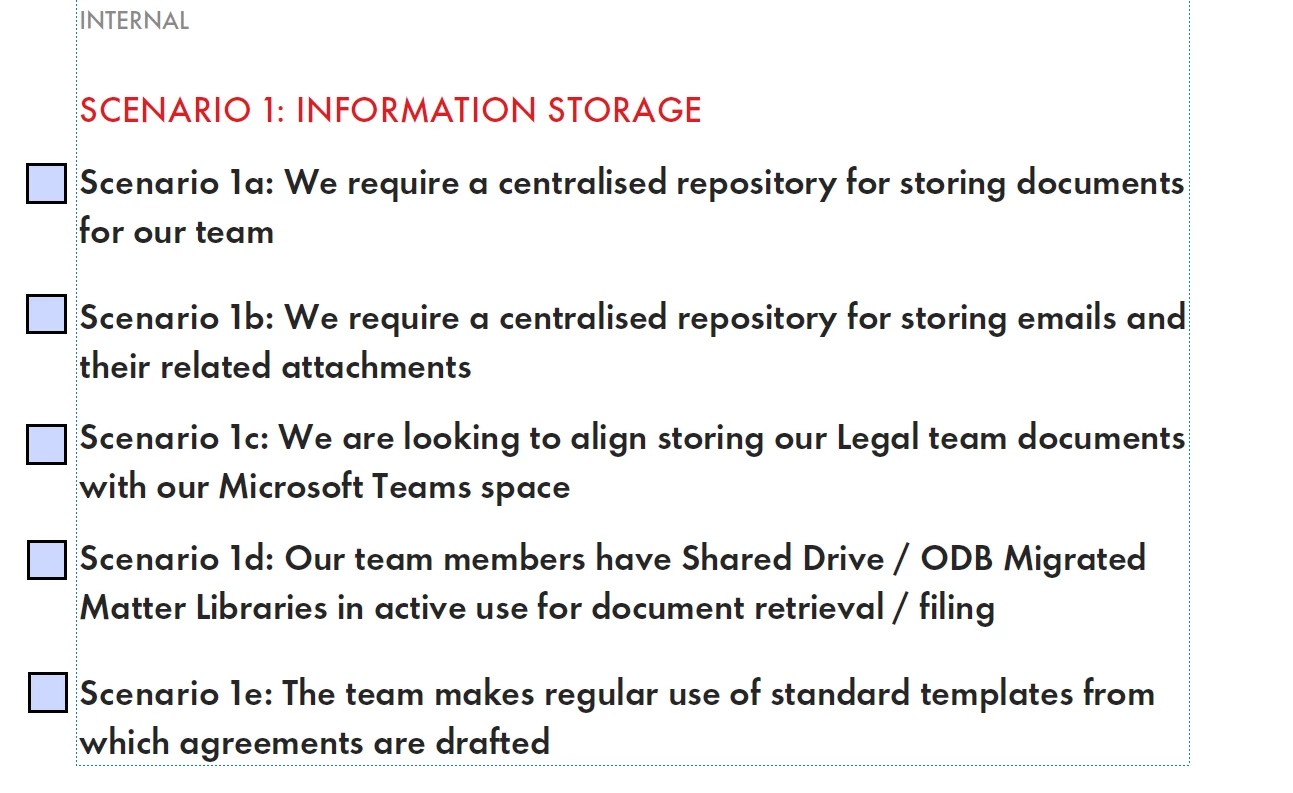
Hi all - some assistance on the below. GPT is getting me almost there, but throwing me off in the step of how to actually *link* a checkbox to pre-written text. In this examle a Word document has been converted to a PDF - with the text as below. What I would like to do is assign each sentence here (marked by Scenario) to a checkbox. The user can pick an associated checkbox, click a button, and it will delete all sentence content not associated to a checkbox.


As a box it would then re-format the entire PDF so everything appears together but this feels like a whole other task, baby steps 🙂
 

This topic has been closed for replies.

2 replies

Thom Parker
Community Expert
Community Expert
February 21, 2024

What do you mean by "GPT is getting me almost there"?  Because it doesn not seem that you are not even remotely close.  There are ways to setup text so that it can be hidden or shown. But that means doing something special to setup the text for this process. What have you done? What did GPT do?


Thom Parker - Software Developer at PDFScriptingUse the Acrobat JavaScript Reference early and often
try67
Community Expert
Community Expert
February 20, 2024

You can't really do that. You can't re-flow an entire PDF's contents, unless the entire file is composed out of fields, and even then it will be very tricky to implement it. You can hide the texts, but then you will have an empty space where they were located.