
Participant
October 14, 2024
Question

linkCreation.dotm requesting access

  • October 14, 2024
  • 2 replies
  • 1687 views

Hi guys - not a tech savvy human so go gentle.
I am running macOS Sequoia 15.0.0 and Microsoft 365 and Acrobat Pro

Both freshly uninstalled and reinstalled and up to date.

Every time I open Word or Excel, I get little pop ups for:


'Grant Access File'.

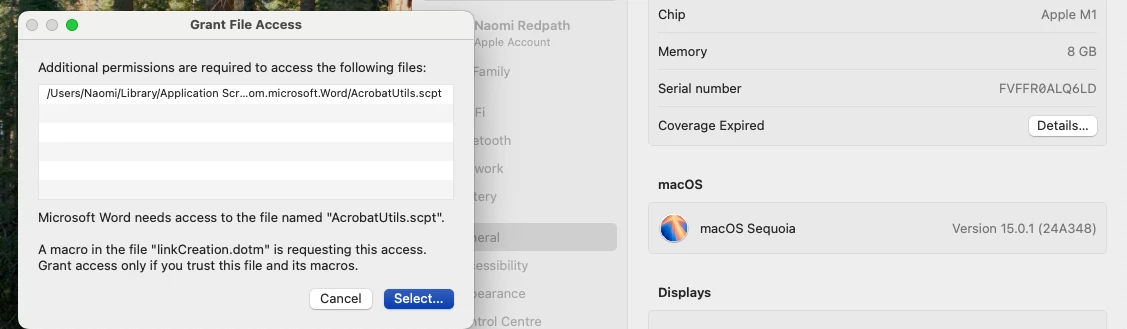
Microsoft needs access to the file named "AcrobatUtils.scpt"

'A macro in the file "linkCreation.dotm" is requesting this access.

(Screenshot below.)


There will be three or four of them, and even after granting access, closing the doc and reopening word/excel with a different or new doc, the pop ups appear again.

I have stopped granting access because I have no clue what I am granting access to ,and it makes zero difference to the outcome.


This only a recent thing - maybe since updating to 15.0.1? But really, I don't know.

I am ready to throw the lot in the trash as I am wasting so much time closing the little pop ups and googling what is wrong.


Please help!!

I have sought help with Microsoft and they are clueless. No answers anywhere.


Lamens terms please - #clueless

Cheers

N
2 replies

Participant
January 21, 2025

Were you able to find a fix for this?

jane-e
Community Expert
Community Expert
January 21, 2025


[removed after reading the post from Michael]


Michael J. Hoffman
Community Expert
Community Expert
February 11, 2025

@jane-e , removing the script file disables the Acrobat PDFMaker from the toolbar in the MS Office application (Powerpoint, Excel, Word, etc). 


The problem is that the file is installed with permissions only for "root" and needs to have the permissions opened up for lwer level user access. I haven't yet found the "right" way to do this, but I believe it's a bug in the installation scripts. This first started happening to me with Sequioa 15.0 and is still a problem in 15.3 with a fresh Acrobat installation.


Here's a snapshot from Terminal showing the issue:


Unfortunately, there doesn't seem to be a "bugs" section here in the Community for Acrobat.

jane-e
Community Expert
Community Expert
October 14, 2024

@naomi_* 


I've moved your post from Using the Community to the Acrobat forum for you.


Jane