
Participant
April 3, 2018
Answered

Lose the graphic attributes exporting PDF to MS Word

  • April 3, 2018
  • 1 reply
  • 1499 views

Dear Technical Support at Adobe!

I have installed Adobe Acrobat Pro 2017 software on Windows 7 and registered. I have checked all updates for the software.

I have a problem with MS Word generation from PDF document. I need to generate MS Word document absolutely identical to PDF original file. I checked the user’s guide on MS Word generation and found out just few pages of paper. Do you have detailed instructions how the user could set-up some settings for MS Word generation?

In original PDF file, named “Test for letter in adobe.pdf”, I have a text elements only . Output Word document named “Test for letter in adobe.docx”, I have two elements: the first one is text string and another one is graphics symbols. Moreover the generated MS Word file has the white color for text characters instead of green. (See below).

Graphic symbols
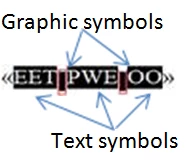
Text symbols

So, I would like to fix two problems:

  1. Graphic symbols usage instead of space in MS Word document.
  2. Green or other color instead of white in MS Word document.

I have PDf example file but I can not attach it to the message.

Please, let me know if you need my contact information to clarify the issues. I am worried to spend money to buy software but I couldn't to get proper result.

I couldn't e-mail my issues because your technical support service doesn't provide such capabilietes.

Best regards,

Artem Kluchnikov

This topic has been closed for replies.
Correct answer AnandSri

Hello Artem,

Sorry for the delayed response and inconvenience caused. As per the description above, output in Word document when you convert a PDF has a different graphics in the resultant Word document, Is that correct?

Please navigate to Acrobat's Preferences, go to Edit>Preferences>Convert From PDF>Word Document>Edit Settings>Select Retain Flowing Text under layout settings, and select "Include Images" under Image Settings>Click OK and see if this changes in the settings bring any difference in the resultant Word document.

You can also refer to the following Adobe article for Advanced PDF conversion settings Adobe PDF conversion settings, Acrobat

Is it possible to share the PDF file with us so that we can test it at our end? To share the file, please use Adobe Send feature, upload the file, share the link to files via private message only, How Do I Send Private Message

I have also checked the records with your current Adobe ID which you have used to sign-in on Adobe forums, and there is no Adobe Acrobat license/subscription is registered.

If you wish to place the order, you can refer to the following Adobe article Plans and pricing | Adobe Acrobat DC

Let us know how it goes and share your findings.

Regards,

Anand Sri.

1 reply

AnandSri
AnandSriCorrect answer
Legend
May 28, 2018

Hello Artem,

Sorry for the delayed response and inconvenience caused. As per the description above, output in Word document when you convert a PDF has a different graphics in the resultant Word document, Is that correct?

Please navigate to Acrobat's Preferences, go to Edit>Preferences>Convert From PDF>Word Document>Edit Settings>Select Retain Flowing Text under layout settings, and select "Include Images" under Image Settings>Click OK and see if this changes in the settings bring any difference in the resultant Word document.

You can also refer to the following Adobe article for Advanced PDF conversion settings Adobe PDF conversion settings, Acrobat

Is it possible to share the PDF file with us so that we can test it at our end? To share the file, please use Adobe Send feature, upload the file, share the link to files via private message only, How Do I Send Private Message

I have also checked the records with your current Adobe ID which you have used to sign-in on Adobe forums, and there is no Adobe Acrobat license/subscription is registered.

If you wish to place the order, you can refer to the following Adobe article Plans and pricing | Adobe Acrobat DC

Let us know how it goes and share your findings.

Regards,

Anand Sri.

Legend
May 28, 2018

"Absolutely identical" is not a realistic expectation. PDF and Word have a very different outlook and very different abilities. The idea of the export is to give you something workable for recreating document where, unluckily, the original was lost.