
Participant
June 28, 2024
Question

Lots of users having saved signatures disappear and have to recreate signature

  • June 28, 2024
  • 2 replies
  • 490 views

Hey There,

I have some users whose saved signatures disapeare from the saved list.

It seems to happen randomly and has only just started to occur in the last 2 or so weeks

The higlighted red signature will just not show as an option and the user has to recreate it 
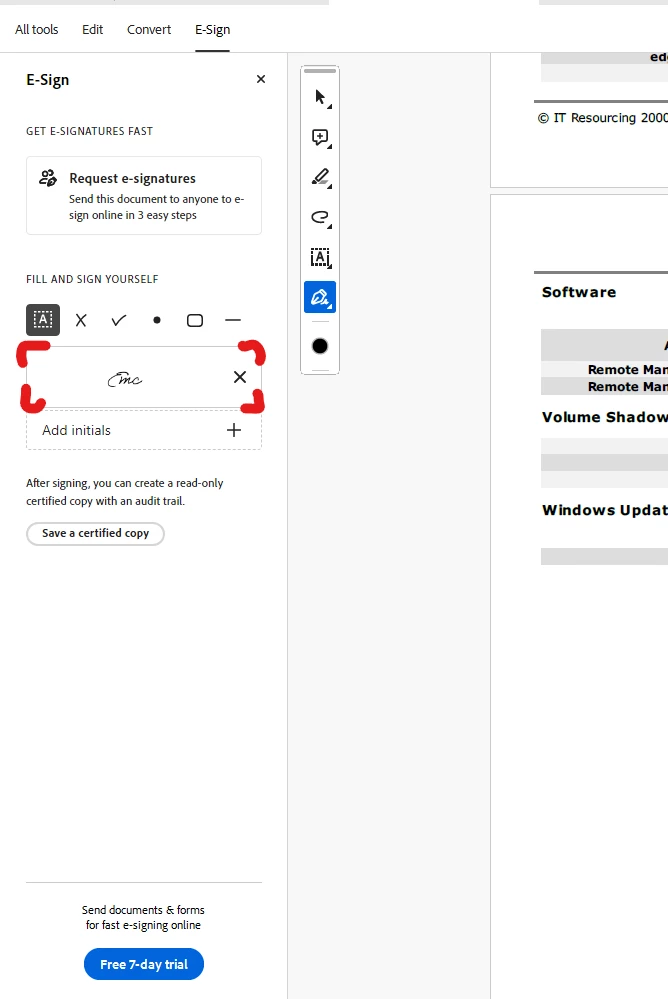
If more info is required feel free to let me know,

Cheers,

Eoin McMahon


This topic has been closed for replies.

2 replies

Legend
August 1, 2024

Hi @Eoin38309702oitj,


Usually, your signature preference will be saved with your profile if you have allowed it to sync. To check the Preference, click on the Acrobat > Hamburger Icon(New UI) or Edit(Classic UI) > Preferences > Adobe Online Services, and Check the Sync settings "Sync preferences across devices and documents services."


You may try signing out of the app and signing back in, which hopefully should fix the issue unless you have deleted the old signature.


~Tariq 

Amal.
Legend
July 8, 2024

Hi there,


Hope you are doing well and thanks for reaching out.


What is the version of the OS and the Acrobat DC you are using? To check the version go to Help > About Acrobat and make sure you have the recent version 24.02.2089x installed. Go to Help > Check for updates and reboot the computer once.
 
Also try to repair the installation from the help menu (Win Only) and see if that works.
 
Please try to reset the Acrobat preferences as described here (https://adobe.ly/3WcMoEP) and see if that works.


~Amal