Participant
July 10, 2019
Question

Low resolution of toolbar and menu

  • July 10, 2019
  • 1 reply
  • 2702 views

Hello everybody,

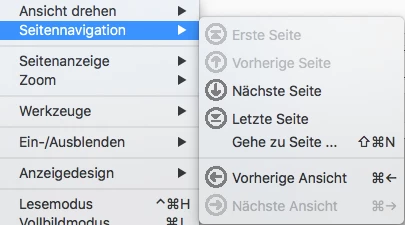
I suddenly have a problem with the toolbar and the menu of my Acrobat DC application.

All icons appear in very low resolution.

Does anybody know how to fix it?

Re-Installation did not make any difference.

I attached two photos.

Thanks and best wishes, Sabrina

This topic has been closed for replies.

1 reply

Inspiring
July 10, 2019

Hi Sabrina,

I understand the situation, As described above you are getting problems with the resolution of toolbar and menu icons. we need to understand a few things:

  • Are you getting this issue with Adobe Acrobat DC or is it with an icon on your computer?
  • Do you have a touchscreen monitor?
  • Are you using a dual monitor?
  • Is your graphic card is updated?
  • What is the version of the operating system installed?
  • What is the version of Acrobat installed? To identify, please take help from the URL Identify the product and its version for Acrobat and Reader DC

In the meantime, you may try to change the scaling option in Acrobat.

  • Open Acrobat >Click on Edit menu>Preferences>general Category >Scale for Screen Resolution
  • If you have a touch screen monitor the scale for screen resolution should be selected to AutoDetect
  • In other case it should be selected to No Scaling

I hope this will help, keep us posted with the results.

Regards,

Amal