


Participant
August 12, 2025
Question

LTR text behaving like RTL text

  • August 12, 2025
  • 1 reply
  • 374 views

I'm attempting to edit a PDF in Acrobat Pro. There are bullets. The moment I make any change to the text, the punctuation flips, as though it's a RTL text.


Before:
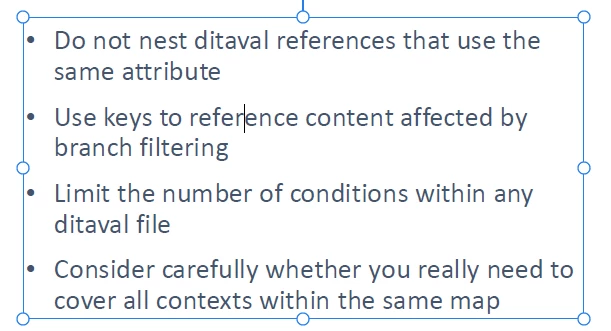
After:
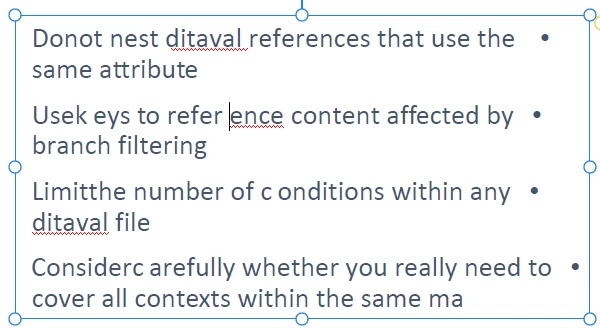
All I did was insert a space in the word "reference", and not only did the punctuation reverse direction, but spaces moved.


Here are my Language settings. I've tried every permutation I can think of, but nothing fixes the problem.
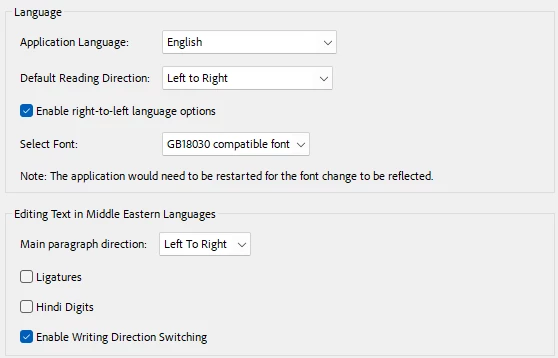
Any suggestions?

1 reply

Legend
August 12, 2025

Thanks for reaching out, @Lisa Liel!
Do you usually switch keyboard languages on your machine? For example, from English to Arabic or Hebrew.  


A similar issue has been reported here: https://adobe.ly/4oxmtDX. Could you confirm if this is exactly what you are experiencing?  


Will be waiting for your response.

Best regards,
Tariq | Adobe Community Team

Lisa LielAuthor
Participant
August 12, 2025

Hi Tariq. I just tried it out, and yes, I get the same issue as the one described in that earlier post by Ahmed.


I do switch between English and Hebrew, but not frequently, and this document is entirely in English.

Lisa LielAuthor
Participant
August 12, 2025

I'm using Win 11 Enterprise, and under region, Israel is set. But this company is international, and if I change it to United States, appropriate updates will not be made. Is it possible that Acrobat is looking at that setting and guessing incorrectly that it should be using RTL punctuation?