
Mailto: opens default email application, but Submit Form action does not
Hi, I'm preparing a fillable PDF to send to a client. On the last page, I have a simple mailto: link to my email address, and if I test click on it, the Windows Mail app opens up right away.
Right below that link, however, I'm trying to include a "Submit" button that will send the client's completed form as an attachment to my email. In this case, the "Submit a Form" action would be best, right? In the action settings, I selected PDF - Include entire document. But when I go to test it by clicking on it myself, a window pops up with a choice between "Default Mail Application" (greyed out) and "Use Webmail."
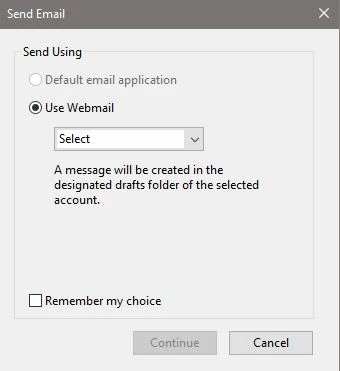
This is not something I would want my clients to encounter, especially since if they were to add an email manually (assuming they even trusted this pop-up), the email would only be saved to their drafts.
I've seen a lot of posts trying to answer the submit form action issue, but they all involve going in to your computer's settings, and in this case I don't want a client to do any of that; I just want them to be able to click a button and have an email ready to send. Can anyone offer advice, or test the file and let me know what happens for you? I've attached the file so you can take a look at it for yourself
 AdChoices