
nancyr4837559
Participant
June 9, 2021
Answered

Make a formatted fillable PDF form 'blank' so user can start with empty fields

  • June 9, 2021
  • 1 reply
  • 1983 views

I've created and formatted a fillable Order Form with radio buttons, check boxes, and drop down menus. I now want to send to the user but don't want any boxes checked on the form, so they can begin 'fresh'.  Is there a way to turn buttons off but keep the functions in place? Please see attached sample. Any help would be greatly appreciated.. I'm using Acrobat DC, exporting the PDF from InDesignCC.
This topic has been closed for replies.
Correct answer Amal.

Hi Nancy


Hope you are doing well and sorry for the trouble. As described you want to send to the user but don't want any boxes checked on the form, so they can begin 'fresh'


Please follow the steps below and see if that helps:


1. Open the PDF form in Adobe Acrobat Pro DC application.

2. Go to Tools > Prepare PDF form

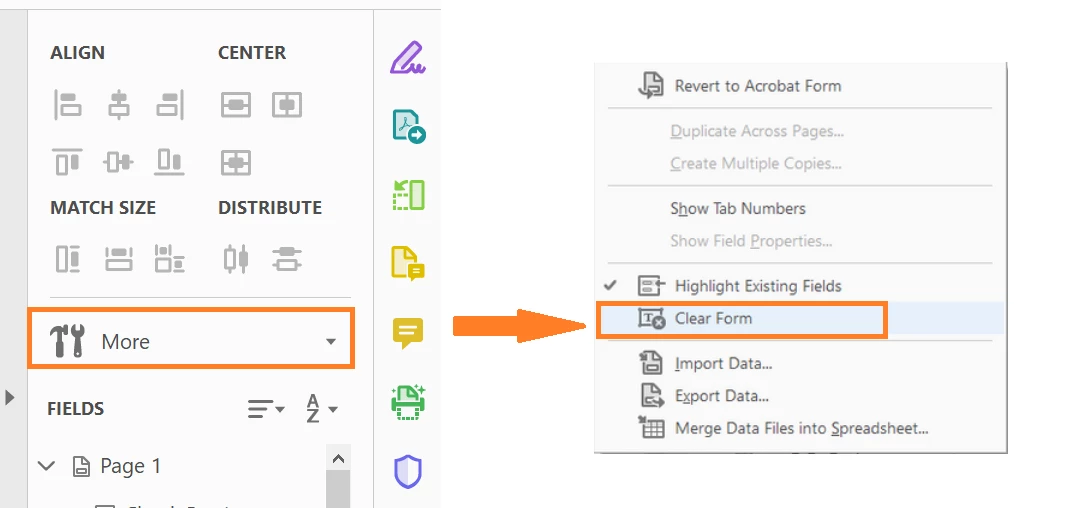
3. In the right hand tool pane click on the 'More' and select 'Clear Form'


Regards

Amal

1 reply

Amal.
Community Manager
Amal.Community ManagerCorrect answer
Community Manager
June 9, 2021

Hi Nancy


Hope you are doing well and sorry for the trouble. As described you want to send to the user but don't want any boxes checked on the form, so they can begin 'fresh'


Please follow the steps below and see if that helps:


1. Open the PDF form in Adobe Acrobat Pro DC application.

2. Go to Tools > Prepare PDF form

3. In the right hand tool pane click on the 'More' and select 'Clear Form'


Regards

Amal

nancyr4837559
Participant
June 9, 2021

That worked, thanks so much!