
Participant
July 31, 2023
Question

Make a PDF fillable

  • July 31, 2023
  • 4 replies
  • 505 views

I have watched countless how-tos. My Adobe version (paid, desktop version) does not have the "prepare form" option to create a fillable PDF (see image). My tools doesnt have this option at all. I can only make a PDF fillable and send it via email with a template, but I need a hard copy on my desk and not a link or email version. Please help as this is extremely frustrating. I have also gone on the web version and tried to do it directly from the PDF itself...no go
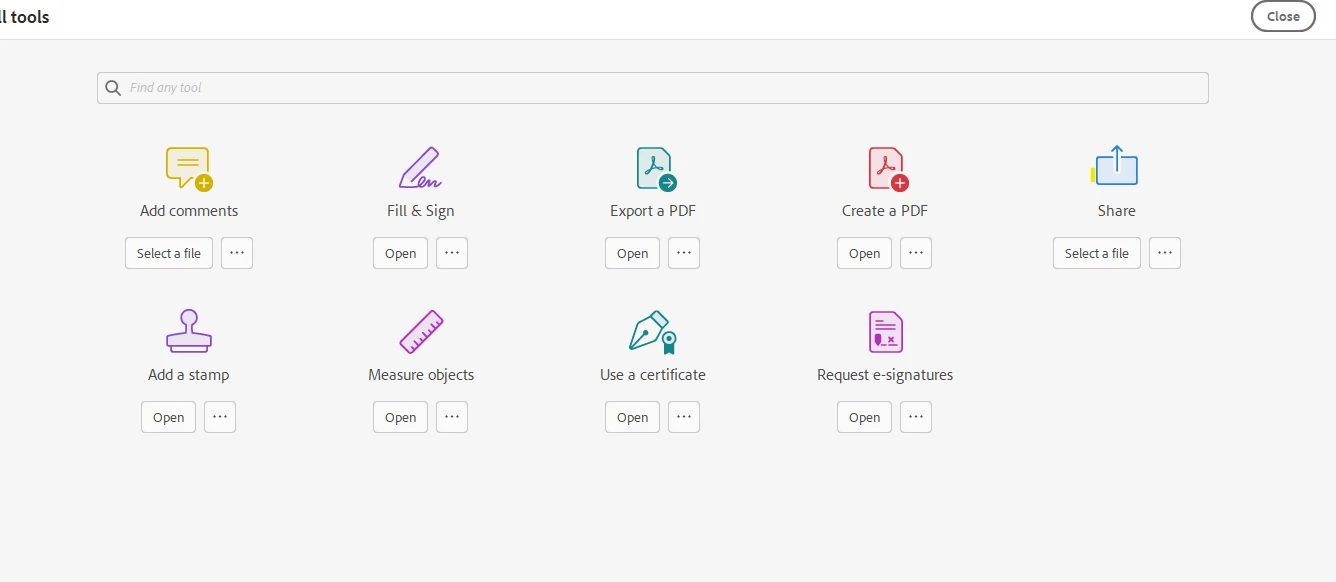
    This topic has been closed for replies.

    4 replies

    Amal.
    Community Manager
    Community Manager
    July 31, 2023

    Hi @Celine3140773470cd 


    ++ Adding to the discussion


    Please remove the application using the Acrobat cleaner tool https://www.adobe.com/devnet-docs/acrobatetk/tools/Labs/cleaner.html , reboot the computer once and reinstall the application using the direct link
    https://helpx.adobe.com/acrobat/kb/acrobat-dc-downloads.html and see if that works.


    Regards
    Amal


    mariahweyne
    Inspiring
    July 31, 2023

    What version are you using?   HELP - ABOUT.  Can you post a screenshot?

    try67
    Community Expert
    Community Expert
    July 31, 2023

    - Can you post a full-window screenshot?

    - What do you see when you search the Tools panel for "form"?

    kglad
    Community Expert
    Community Expert
    July 31, 2023

    in the future, to find the best place to post your message, use the list here, https://community.adobe.com/

    p.s. i don't think the adobe website, and forums in particular, are easy to navigate, so don't spend a lot of time searching that forum list. do your best and we'll move the post if it helps you get responses.


    <"moved from using the community">