
Participant
September 11, 2022
Answered

Make some text boxes required based on radio button choice?

  • September 11, 2022
  • 1 reply
  • 2198 views

I am trying to create a Javascript so that when any of the radio buttons in a set are selected, other text boxes are now required to be completed. Here's a screenshot of the table I'm working with:
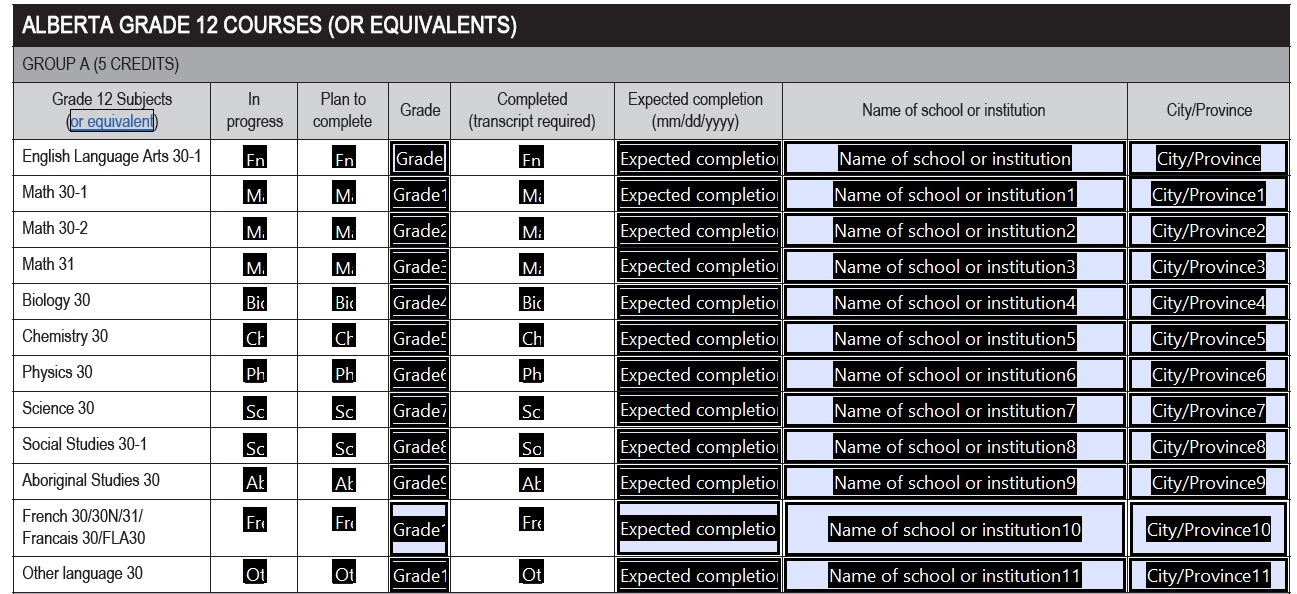
As an example, if someone selects the "In progress" or "Plan to complete" radio buttons in the English Language Arts 30-1 row, the "Grade", "Expected completion", "Name of school or institution", and "City/Province" fields must be completed. However, if someone selects the "Completed" radio button in the English Language Arts 30-1 row, only the "Expected completion", "Name of school or institution", and "City/Province" fields must be completed.


Is what I'm hoping to do possible? I have some coding experience but none within Javascript, so this is throwing me for a loop!

This topic has been closed for replies.
Correct answer ls_rbls

With mutually exclusive radio buttons this may be achieve very easy.


Assuming that the first two radio buttons export values are "Choice1" and "Choice2" respectively, you may use a simple MouseUp event script like the example below:


/* copy and paste this script into radio button 1 and button 2 as MouseUp event */

if (event.target.value == "Choice1") {

this.getField("Grade").required = true;

this.getField("Expected Completion").required= true;

this.getField("Name of School").required= true;

this.getField("City/Province").required= true;

 }


NOTE: When using the same script above for the second radio button change export value name "Choice1" to "Choice2".


And on radio button 3 of that same group use:


/* copy and paste this script into radio button 3 
*/

if (event.target.value == "Choice3") {

this.getField("Grade").required = false;

this.getField("Expected Completion").required= true;

this.getField("Name of School").required= true;

this.getField("City/Province").required= true;

 }


Not very elegant script nor a fancy "for loop" solution but it gets the job done.

1 reply

ls_rbls
Community Expert
ls_rblsCommunity ExpertCorrect answer
Community Expert
September 11, 2022

With mutually exclusive radio buttons this may be achieve very easy.


Assuming that the first two radio buttons export values are "Choice1" and "Choice2" respectively, you may use a simple MouseUp event script like the example below:


/* copy and paste this script into radio button 1 and button 2 as MouseUp event */

if (event.target.value == "Choice1") {

this.getField("Grade").required = true;

this.getField("Expected Completion").required= true;

this.getField("Name of School").required= true;

this.getField("City/Province").required= true;

 }


NOTE: When using the same script above for the second radio button change export value name "Choice1" to "Choice2".


And on radio button 3 of that same group use:


/* copy and paste this script into radio button 3 
*/

if (event.target.value == "Choice3") {

this.getField("Grade").required = false;

this.getField("Expected Completion").required= true;

this.getField("Name of School").required= true;

this.getField("City/Province").required= true;

 }


Not very elegant script nor a fancy "for loop" solution but it gets the job done.

Participant
September 12, 2022

Thank you so very much. This is immensely helpful! I have two further questions; is "English Language Arts 30-1 In progress" the name I would put in instead of "Choice1"?

Also, do these settings look right for the Actions (provided that I've input the correct JavaScript)?

Thanks again!

ls_rbls
Community Expert
Community Expert
September 13, 2022

++ EDITED REPLY


Yes, you're very welcome.


For the first screenshot, if you're referring about the export value for that radio button, it is found in the "Options" tab. The "General" tab provides a blank to specify the field object name (not the export value that will be used in the script), while the "Options" tab provides you with a blank to change the name of the export value for that radio button.


However, because the scripts that are provided are executed directly from each radio button "event.target.value" represents the field object where the event will be triggered, and since they're are mutually exclusive radio buttons you don't need to change the field name for this script to work..


The term Mutually Exclusive denotes a group of two or more radio buttons (or checkboxes) that will be used in together as a group but each event will be triggered independently from each other; a method that is only possible when all three widgets are assigned with the same field name but each one has its own unique export value.


In other words, the three events cannot occur simultaneously, only independently from each other. Otherwise,  they will trigger the event simultaneously and in unison (which is not what you want in this scenario)


Here's a good article from ACP Thom Parker:


As for the second screenshot, yes,  that is the correct dialogue window to add your JavaScript script.


Click once on the "Run a JavaScript" label to select it, and then click on the "Edit" button; the JavaScript editor will open up where you can paste the script provided (or a modified version of your own). 


After you're done, just click on the "Close" button and save your document to preserve the changes.