Participating Frequently
March 28, 2017
Answered

Make transparent background opaque

  • March 28, 2017
  • 1 reply
  • 21630 views

Hi,

Is there a way in Acrobat to change a transparent background to opaque white please?

This topic has been closed for replies.
Correct answer Karl Heinz Kremer

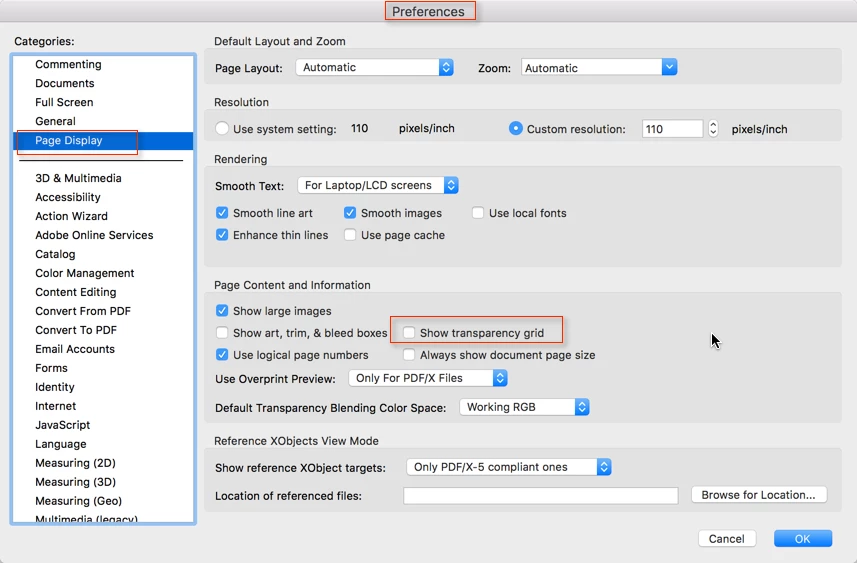
Most PDF files don't have a background. You can see that when you turn on the "transparency grid" in Acrobat's preferences:

If you want a true background, you can add one via the Tools>Edit PDF>Background feature. Just create a page that has the background color you want, and add it to every page in your document.

1 reply

Karl Heinz  Kremer
Community Expert
Karl Heinz KremerCommunity ExpertCorrect answer
Community Expert
March 28, 2017

Most PDF files don't have a background. You can see that when you turn on the "transparency grid" in Acrobat's preferences:

If you want a true background, you can add one via the Tools>Edit PDF>Background feature. Just create a page that has the background color you want, and add it to every page in your document.

Participating Frequently
March 29, 2017

Thanks Karl, it's easy to add a background based on a colour only, no need to create a page.

Participant
August 19, 2021

Is there a way to create a stamp with an opaque background? I want to blot out what is underneath the stamp.