


Inspiring
April 15, 2021
Answered

Making a Delete button For a form Via JAVASCRIPT

  • April 15, 2021
  • 2 replies
  • 4080 views

Hello,

I am trying to create buttons for corresponding fields that when clicked will remove the fields and replace the fields with the fields below.
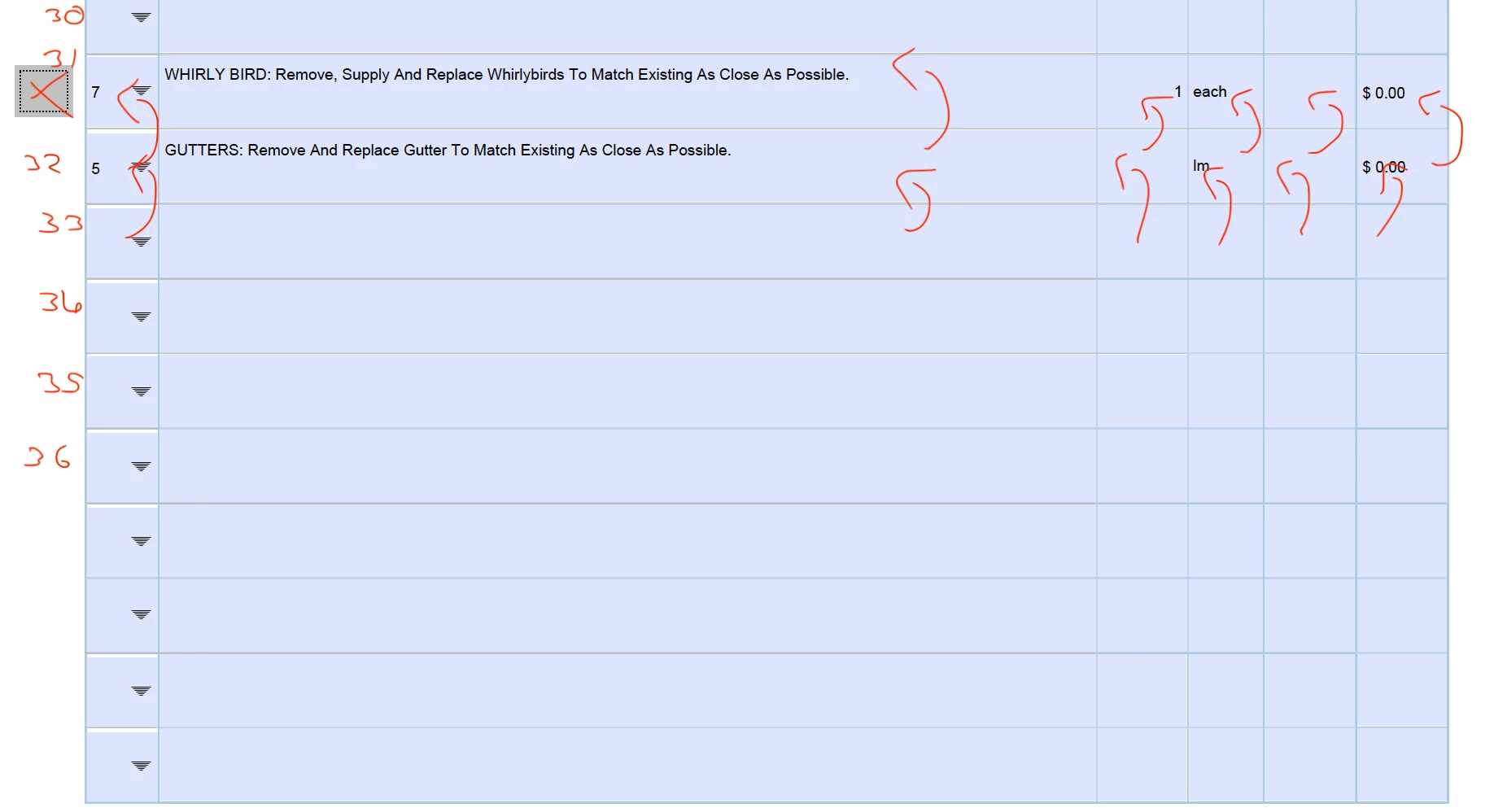
I have placed this javascript in a button under "run a javascript" when "mouse up"

var idNumber = event.target.name.replace("Delete", "");
for(var i = (parseInt(idNumber)); i <= 40; ++i) {
this.getField("ID"+(parseInt(idNumber)+(i)-1)).value = this.getField("ID"+(parseInt(idNumber)+(i))).value;
this.getField("Desc"+(parseInt(idNumber)+(i)-1)).value = this.getField("Desc"+(parseInt(idNumber)+(i))).value;
this.getField("No"+(parseInt(idNumber)+(i)-1)).value = this.getField("No"+(parseInt(idNumber)+(i))).value;
this.getField("Unit"+(parseInt(idNumber)+(i)-1)).value = this.getField("Unit"+(parseInt(idNumber)+(i))).value;
this.getField("Price"+(parseInt(idNumber)+(i)-1)).value = this.getField("Price"+(parseInt(idNumber)+(i))).value;
this.getField("Total"+(parseInt(idNumber)+(i)-1)).value = this.getField("Total"+(parseInt(idNumber)+(i))).value;
}


 I have done some tests and it seems that the problem is with thee "i" variable
can someone please help me with this problem

Thank you all kindly in advance!

-Flynn

This topic has been closed for replies.
Correct answer Bernd Alheit

Something like this:

var idNumber = parseInt(event.target.name.replace("Delete", ""));
for (var i = idNumber; i < 40; i++) {
  this.getField("ID" + i).value = this.getField("ID" + (i + 1)).value;
  ..
}
var i = 40;
this.getField("ID" + i).value = "";
...

2 replies

try67
Community Expert
Community Expert
April 16, 2021

So you want to delete the values in the first row?

Flynn0101Author
Inspiring
April 16, 2021

@try67 
I want to replace the field with the field below it (Like in the poorly drawn picture).

The goal is to have a button next to every row so that when pressed all of the fields will move up into the field before it. It replaces the values with the fields below it and then the fields under that will be replaced and so on.

try67
Community Expert
Community Expert
April 16, 2021

Yes, I understood. But that means the values in the first row will be deleted...

Bernd Alheit
Community Expert
Community Expert
April 16, 2021

What field names does you use?

Flynn0101Author
Inspiring
April 16, 2021

@Bernd Alheit 
The field names are a word plus a number that ranges from 1- 40. so the first columns all the words are
"ID1", "Desc1", "No1", "Unit1", "Price1" "Total1", 
and at the last column the fields are 

"ID40", "Desc40", "No40", "Unit40", "Price40" "Total40", 
The corresponding Button is labelled "Delete"+(1-40)

Flynn0101Author
Inspiring
April 16, 2021

@Bernd Alheit 

EDIT: I meant ROWS, not Columns!