Participant
October 11, 2018
Answered

Making a PDF searchable - bad OCR job

  • October 11, 2018
  • 3 replies
  • 2665 views

When I download PDFs from this one specific site, the invoice part of the page is an image. When I use the "Edit PDF" button and Adobe runs OCR, the text becomes gobbledy-gook. Is there a better method for getting this rendered better. I reached out to the site asking if they could change how they render their PDFs, but they said it would always be an image (hey, had to ask!). There's not a lot in settings; I've used and not used "Use system font" and neither works (if anything, using system font makes it even worse). My ultimate goal is to have a searchable PDFs.
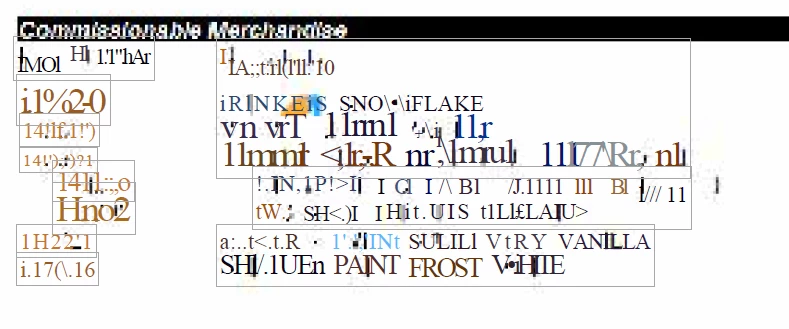
Thanks!!

This topic has been closed for replies.
Correct answer heatherm625

I figured out a way to do it! Optimize PDF >> Preflight >> Convert all pages into CMYK images and preserve text >> Analyze and Fix. After that's done, just search for something on the page, and then when it does text recognition and it doesn't go all wonky and I'm able to search YAY Yes, this multistep task is worth it for me. Perhaps there's an easier way, but nothing else I found was working. I literally poked around and tried things all on my own (even more than I did before posting here, which was A LOT)

3 replies

Legend
October 11, 2018

"Rekey" - Type in the information again.

Participant
October 11, 2018

I tried that, but some of the background goop stays on the page like a bad scan and what I key in doesn't search anyway I guess I'm out of luck. I have over a hundred of these files and when I did a batch job on them, all of them became searchable. However, when I add new ones, I'm getting the messed up version.

heatherm625AuthorCorrect answer
Participant
October 11, 2018

I figured out a way to do it! Optimize PDF >> Preflight >> Convert all pages into CMYK images and preserve text >> Analyze and Fix. After that's done, just search for something on the page, and then when it does text recognition and it doesn't go all wonky and I'm able to search YAY Yes, this multistep task is worth it for me. Perhaps there's an easier way, but nothing else I found was working. I literally poked around and tried things all on my own (even more than I did before posting here, which was A LOT)

Legend
October 11, 2018

Deliberate or not, it's something about how they make it. OCR is made for print resolution files. You'll probably need to rekey these.

Participant
October 11, 2018

What does that mean? Rekey?

Legend
October 11, 2018

Which site? It might be deliberately difficult to OCR to prevent you doing that, from what they say.

Participant
October 11, 2018

I don't think so. They're order summaries for things I've purchased. Just an invoice. Why wouldn't they allow me to keep records of my purchases? When they responded to me, it wasn't presented as "we're preventing you from doing it" just more of "this is how our system is set up."