
Participant
November 2, 2022
Answered

Making a PDF without quality loss

  • November 2, 2022
  • 2 replies
  • 791 views

Hello, friends.

I have some tiff files (some art pages) with the same size and I want to make a PDF file with them. I'm using acrobat XL and I want my pdf to have the exact quality. I know how to do this, but in my test, the final file had a big quality loss. How can I make this work?

P.S: is there any way to convert a CMYK pdf file to RGB?
Correct answer JR Boulay

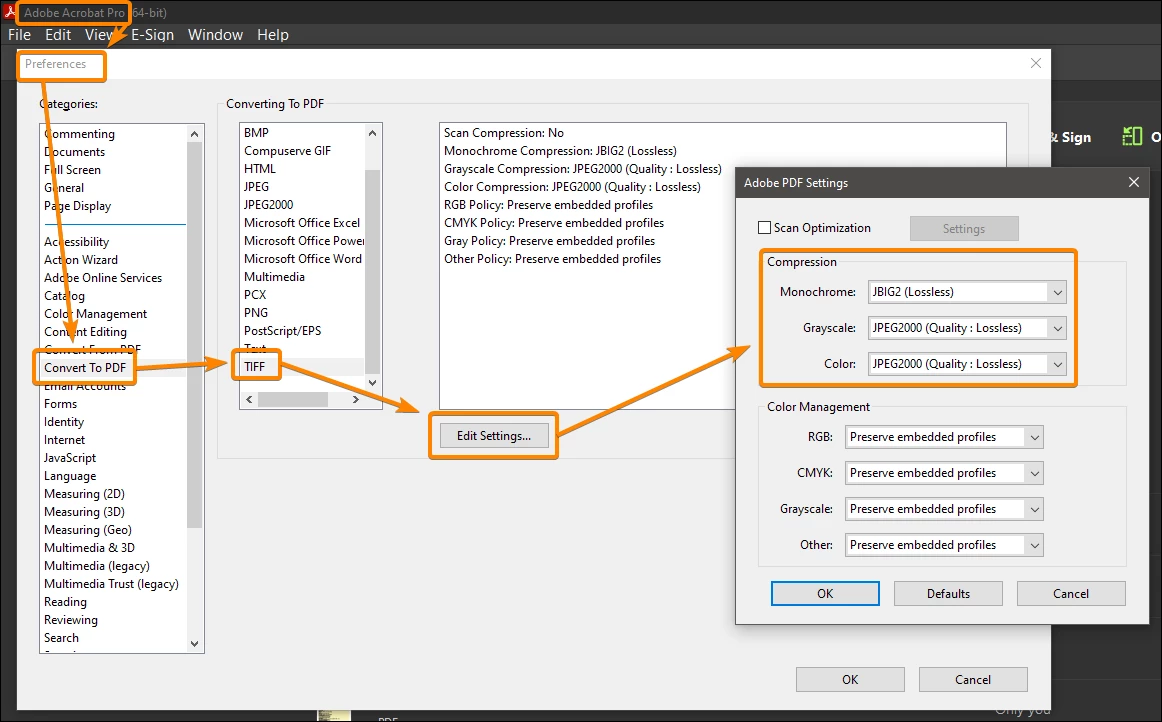
You must use lossless compression formats:


2 replies

JR Boulay
Community Expert
JR BoulayCommunity ExpertCorrect answer
Community Expert
November 2, 2022

You must use lossless compression formats:


Acrobate du PDF, InDesigner et Photoshopographe
try67
Community Expert
Community Expert
November 2, 2022

- Go to Edit - Preferences - Convert to PDF - TIFF and set all the settings to the highest possible quality.

- You can convert colors using the Preflight tool or the Convert Colors tool of the application, under Tools - Print Production.