
tbolduc73
Participant
March 16, 2017
Answered

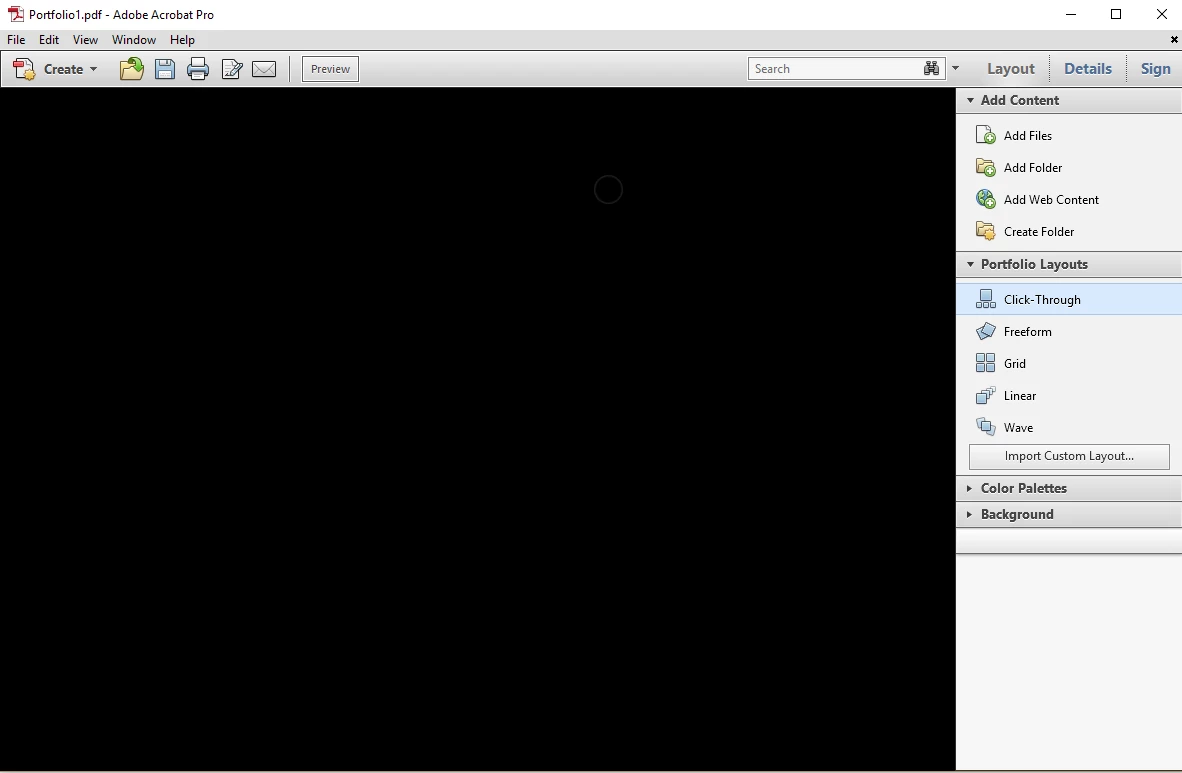
Making pdf portfolio results in black layout screen

  • March 16, 2017
  • 1 reply
  • 1694 views

Hello,

So I am trying desperately to create pdf portfolios using Acrobat XI. My flash player is up-to-date, but I continue to get a black layout screen when I attempt to create a portfolio. It looks like the uploads happened, but nothing but blackness. I see none of the file. Other than an old version of flash, what could be causing this?  Acrobat Pro XI or Reader are not my default pdf readers (I do not have admin privileges to change this). I am doing this at the office, so no cloud-based work here. Is that the issue? Thanks in advance to anyone who can help me with this.
[Moved from non-technical Lounge Forum to an Acrobat forum... Mod]

[Here is the list of all Adobe forums... https://forums.adobe.com/welcome]

This topic has been closed for replies.
Correct answer Adorobat

Hi tbolduc73,

Could you please try downloading full Flash Player from the following link and see if that resolves the issue?

Adobe Flash Player needed for Adobe Acrobat and Adobe Acrobat Reader

Let me know how it goes.

Thank You,

Shivam

1 reply

Adorobat
Community Manager
AdorobatCommunity ManagerCorrect answer
Community Manager
March 19, 2017

Hi tbolduc73,

Could you please try downloading full Flash Player from the following link and see if that resolves the issue?

Adobe Flash Player needed for Adobe Acrobat and Adobe Acrobat Reader

Let me know how it goes.

Thank You,

Shivam

Participant
November 2, 2019

I get the same problem. The white frame is actually black on screen.


Adobe Acrobat Pro 9.5.5

NPAPI 32.0.0.270

PPAPI 32.0.0.270

MacOS Mojave 10.14.6

Safari 13.0.3