chrisa67173999
Inspiring
April 5, 2018
Answered

Making Tables Accessible in a PDF

  • April 5, 2018
  • 1 reply
  • 4376 views

I'm creating an Accessible PDF (using Adobe InDesign) that is going to be mostly tables and I'm having issues getting the AT (I'm using VoiceOver on Mac) to read the table column headers as you are reading the row cells below each column header. (Ie. Column Header is labeled 'COLOR', and the cell below is labeled 'RED'. It should say "COLOR, RED" as you tab through the row)

However, I cannot get VoiceOver to read the Tables correctly. It just reads "RED, Column 1, Row 2", not "COLOR, RED".

As a test, I created a simple table using InDesign. My table is set to have one 'Header Row' in InDesign. I exported the PDF from InDesign and in export setting I included all the document tags. In Acrobat, I opened the PDF and in the 'tags' preference panel and I updated the table headers to be 'table header cells' and changed the scope to be 'Column'. I was able to find a few tutorials and all said this was the step you needed to do in Acrobat to make the tables accessible, so I'm confused!

Does anyone have any suggestions as to what I'm missing or doing incorrectly? See attached screenshot of the table/tag setup I currently have in Acrobat.

Thanks!
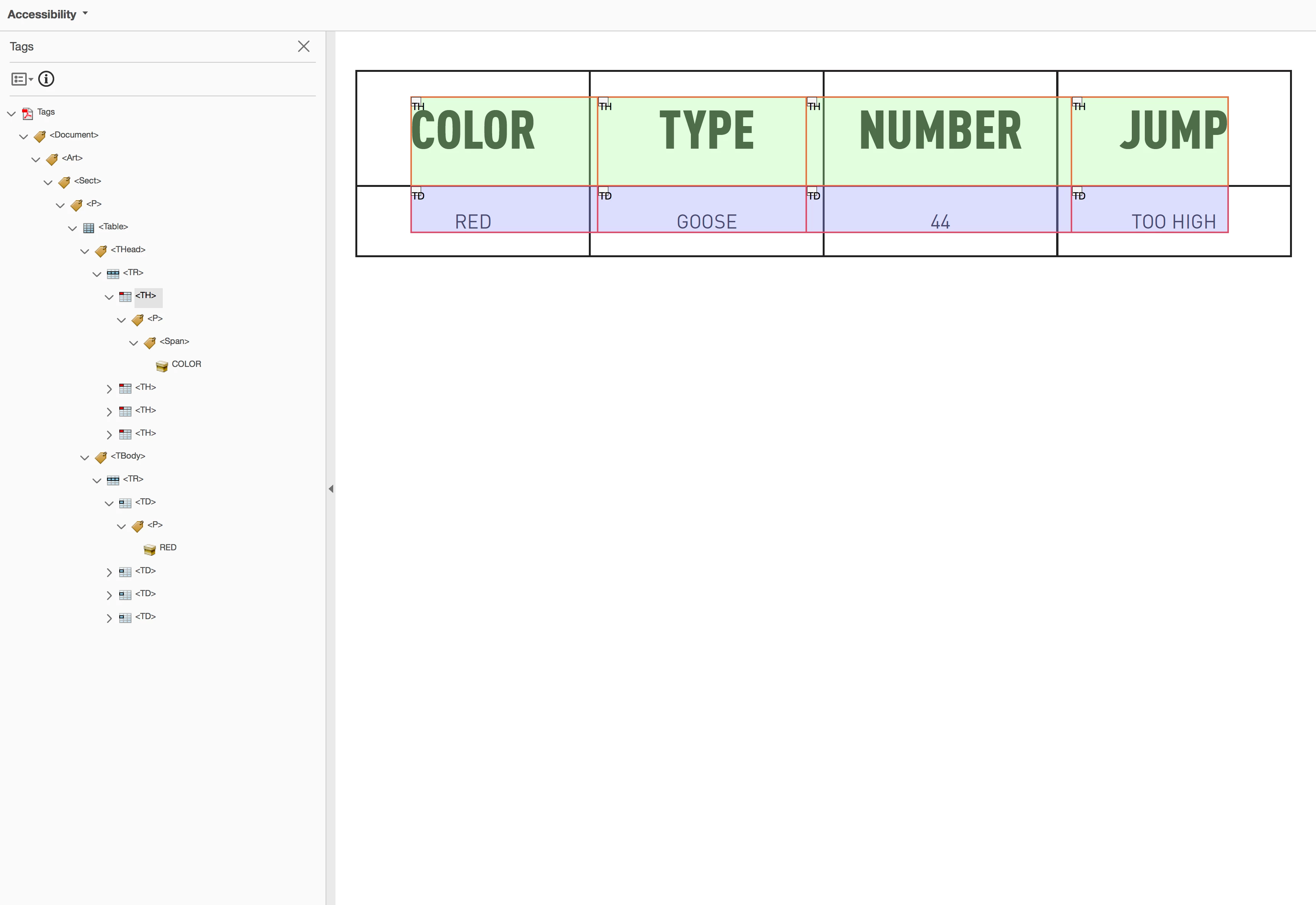
This topic has been closed for replies.
Correct answer chrisa67173999

chrisa67173999  wrote

Hi Olaf - Yes, VoiceOver and other AT are definitely capable of reading column header data like I'm expecting it to.

I am pretty confident it does support reading column headers on let's say web pages in a browser.

PDFs are a different beast, and VoiceOver has only be catching up bit by bit  over time regarding good document support in PDF documents. My guess is that support for header columns isn't there yet for PDF documents...

Olaf


Thanks Olaf - You got me thinking more about the AT then the PDF, I tested the file on a Windows machine using NVDA and it worked, so appears to be a VoiceOver issue with PDFs.

1 reply

Inspiring
April 5, 2018

Have you verified that VoiceOver actually does support the behavior for tables in PDF documents you are expecting?

It's a long time since I checked VoiceOver's capabilities in this regard, but back then it did not support this.

In order to be able to nail down where the problem really is... - do you have a PDF document that is known/has been verified by you where VoiceOver processes tables / header and data cells in that PDF document as you'd expect it to do?

Olaf

chrisa67173999
Inspiring
April 5, 2018

Hi Olaf - Yes, VoiceOver and other AT are definitely capable of reading column header data like I'm expecting it to. It has a preference for that and in the VoiceOver Training it shows you a table and it reads the column headers for you before reading row cell data.

As far as me having a working PDF, I unfortunately don't. So perhaps it's not possible, however it seems like I at least have my file set up correctly according to everything I found. Here's the official WCAG guidelines for PDF tables and it makes it seem like it should work, but perhaps I'm not reading this correctly. PDF6 is the section that tags about tables:  PDF Techniques | Techniques for WCAG 2.0  

Another resource I found...http://www.the508compliantpdf.com/creating_simple_tables_in_indesign_and_acrobat/

So it's possible my PDF is set up correctly and is considered accessible, but in my view, I don't know how it could be considered so from what I'm experiencing. I don't know how someone using AT viewing a PDF would be able to make sense of a large table without being able to reference the column headers.

Inspiring
April 5, 2018

chrisa67173999  wrote

Hi Olaf - Yes, VoiceOver and other AT are definitely capable of reading column header data like I'm expecting it to.

I am pretty confident it does support reading column headers on let's say web pages in a browser.

PDFs are a different beast, and VoiceOver has only be catching up bit by bit  over time regarding good document support in PDF documents. My guess is that support for header columns isn't there yet for PDF documents...

Olaf