
timothyj64909007
Participant
July 25, 2017
Answered

Managing unnumbered pages

  • July 25, 2017
  • 1 reply
  • 2363 views

I have a PDF file of a book in which the front matter (title page, table of contents, preface, etc) is all on unnumbered pages. The file's page numbering begins, on p. 2, with the second page of the first chapter. When I try to select any of the unnumbered pages using Acrobat Pro's "Organize pages" tool, I am instructed to enter a valid page range. How can I manage (specifically export or print) these unnumbered pages?
This topic has been closed for replies.
Correct answer Dave__M

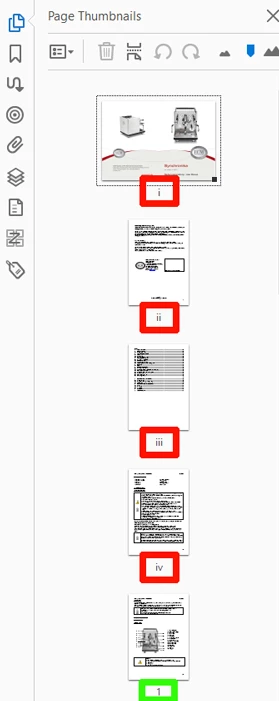
If you go to the Organize Pages tool set, you can click on the word ‘More’ in the toolbar across the top.  Select Page Labels.  From the resulting dialog box, Choose ‘Begin new section’, and in the Start box, enter the pages (at the front of your doc).  You can give these pages their own numbering system – even if temporarily.  Try lowercase Romans.  When you click OK, those pages should then carry official page number of i, ii, etc.  This should allow you to manipulate them without issue.  You should be able to change the numbering system back later, if you wish by using the same technique, if desired.

I hope this is helpful.

My best,

Dave

1 reply

Dave__M
Community Expert
Dave__MCommunity ExpertCorrect answer
Community Expert
July 25, 2017

If you go to the Organize Pages tool set, you can click on the word ‘More’ in the toolbar across the top.  Select Page Labels.  From the resulting dialog box, Choose ‘Begin new section’, and in the Start box, enter the pages (at the front of your doc).  You can give these pages their own numbering system – even if temporarily.  Try lowercase Romans.  When you click OK, those pages should then carry official page number of i, ii, etc.  This should allow you to manipulate them without issue.  You should be able to change the numbering system back later, if you wish by using the same technique, if desired.

I hope this is helpful.

My best,

Dave

timothyj64909007
Participant
July 26, 2017

This solution worked! Many thanks for your assistance.

Dave__M
Community Expert
Community Expert
July 26, 2017

Glad it works for you!

My best,

Dave