

Manually change the order number of a PDF within a portfolio
How can you change the actual order number (not sort by order in a descending or ascending manner) of each PDF within a portfolio? In previous version of Adobe Acrobat, when creating or editing a PDF Portfolio you could open a pane labeled "Specify File Details" and within that you could create certain descriptive fields for the specific file. I would create a "Sort" field and utilize 'numbers' rather than text. I would then number the files in the order I want them presented to the reader when opening the file. I could simply 'double click' on that column within the 'specify file details' window and enter whatever number I wanted for that file. In the newest version (I've finally upgraded from CS4 - was very adept at the CS4 version of Acrobat Pro, but this new Adobe Acrobat Pro DC version is too....well, it tries to be too 'user friendly'), I see the "Order" column for each PDF in the portfolio, but I can't seem to edit that number to rearrange the files in the order I choose.
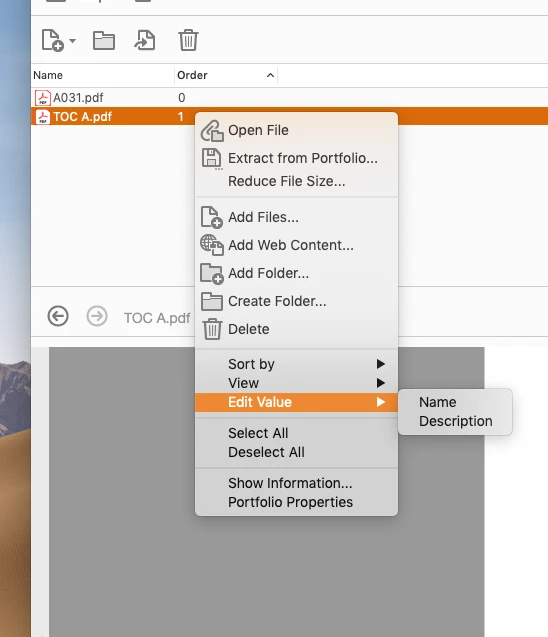
When I 'right click' the individual PDF, I get the pop up that says; "Edit Value", but the only options are "Name" and "Description".
Screen shot attached, any help would be tremendous.
 AdChoices